
TL;DR — Securing Claude Cowork
- Use a managed device, a clearly scoped working folder, and normal employee identity only where the workflow requires it.
- Use organization network settings and connector permissions for cloud sessions. Validate device proxies separately for local execution, browser traffic, and local agent tools.
- Install a trusted enterprise CA only on managed devices where you are allowed to inspect traffic.
- Treat browser use and computer use as UX surfaces that need runtime policy enforcement and coarse UI guardrails.
- Enable Compliance API transcript capture before rollout, and keep PHI out because Anthropic's BAA excludes Cowork.
Claude Cowork brings Claude Code's agentic architecture into Claude Desktop for knowledge work. Anthropic describes Cowork as using the same agentic architecture that powers Claude Code, with access to local files, sub-agents, isolated code execution, connectors, Chrome, and in some cases direct control over desktop apps. Those capabilities create the security boundary.
The deployment question is concrete: what can Claude reach, what traffic can you observe, what actions can you block, and what happens when a malicious webpage, email, PDF, spreadsheet, or internal dashboard becomes part of the agent's context? Anthropic has invested in model-side defenses and content classifiers, but its own browser-use prompt injection writeup says prompt injection remains unsolved. We cover the offensive side of this surface in our jailbreak cookbook.
This post is a deployment guide for putting Claude Cowork behind a middleman control plane.
Cowork Security Boundary#
Identify the session's execution mode before placing a proxy. Anthropic's architecture overview says Cowork runs in the cloud by default, with local execution still available for existing desktop deployments. Cloud sessions use an Anthropic-managed sandbox and egress proxy; connector calls run server-side. Local sessions split the native agent loop from code and shell execution in a Linux VM.
Cloud access to connected local folders and browser tools passes through Claude Desktop and requires the device to be online. That connection does not bring cloud sandbox or connector traffic through your device proxy. Apply organization network settings and connector permissions to those remote paths, and validate local interception separately.
Kir Shatrov's reverse engineering of Claude Code is useful background because it shows Claude Code as a multi-step agent runtime. A user request can turn into planning, tool selection, delegated file reads, Bash safety classification, and follow-up calls. Cowork's desktop UX hides more of that machinery, so security teams need controls around the whole task graph rather than only the first user prompt.
The most important distinction is between four paths:
| Path | Typical control | Main risk |
|---|---|---|
| Local files | Folder grants and deletion prompts | Claude reads, edits, or deletes data outside the intended scope |
| Code execution | Isolated Linux VM and network egress settings | Code produces data that later flows into a less controlled tool |
| Browser use | Claude in Chrome permissions, managed browser policy, on-device proxy, optional profile isolation | Web content can carry hidden instructions while authenticated sessions are available |
| Computer use | Per-app approval, app blocklists, network/tool policy enforcement | Claude clicks, types, and takes screenshots on the real desktop outside the Cowork VM |
Anthropic's own safety docs make the same trust-boundary point. In Cowork, computer use can click, type, and navigate the screen directly, and Anthropic says this path has no sandbox between Claude and the approved desktop apps. The separate computer-use guide says screenshots may include visible personal or confidential data, and describes per-app permission prompts, an app blocklist, and default blocks for some sensitive app categories. Those controls are real, but coarse. They help deny broad app categories; they are too broad to decide whether a specific upload, paste, message, export, or admin action is safe.
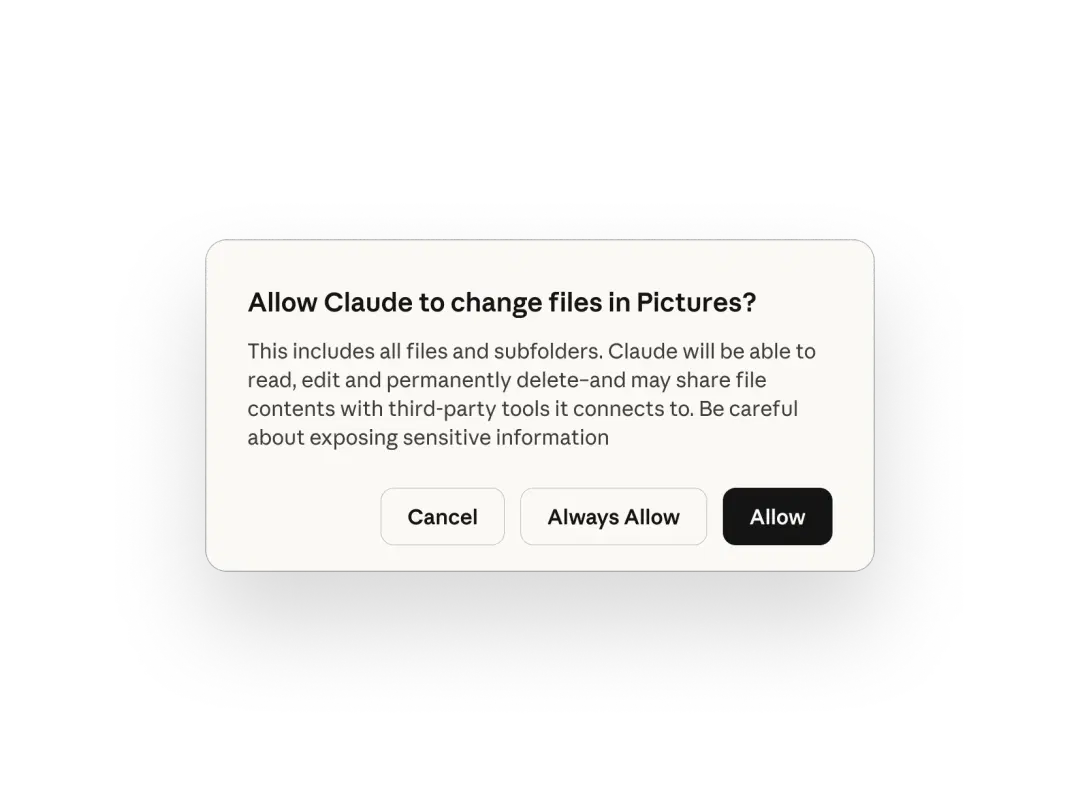 The actual Cowork folder-grant prompt. "Always Allow" is a one-click decision that hands Cowork read, edit, delete, and share-with-tools authority over an entire directory tree — which is why the proxy and policy layer matter once that dialog is dismissed. Source: claude.com/product/cowork.
A proxy gives you network visibility and enforcement at the point where data leaves the device or tool boundary. Pure local clicks and screenshots still need app permissions, endpoint controls, and human approval because Claude can click "Send" inside a local app you approved.
Detect and respond to employee AI agent risk
General Analysis AI Detection and Response monitors employee AI agents across files, browsers, MCP servers, connectors, scheduled work, and downstream business actions. It gives security teams the trace, policy decision, and response workflow needed to stop unsafe data movement.
Proxy Control Pattern#
A middleman proxy is useful because it gives security teams a place to observe, classify, redact, and block agent traffic. For Claude deployments, there are two versions:
- Network middleman: an explicit HTTP(S) proxy such as mitmproxy, Zscaler, CrowdStrike Falcon, Netskope, or a corporate forward proxy. This sees requests only if the client routes traffic through it and trusts the proxy CA for TLS inspection.
- Application middleman: an LLM gateway or MCP gateway that sits between the agent and the model/tool APIs. This is where you can enforce prompt logging, tool allowlists, data-loss prevention, approval rules, and per-tool rate limits.
Use both when possible. A TLS proxy is good at seeing where traffic goes and what the HTTP payload contains after decryption. An application gateway is better at understanding intent: "this tool call is about to email a file," "this prompt contains a credential," or "this MCP server is trying to reach a new domain."
The proxy layer can also enforce policy with an LLM judge. The basic flow is simple:
- The on-device proxy or gateway pauses a request, response, tool call, upload, share, or message-send event.
- It extracts the policy-relevant fields: user, device, task, destination, app, recipient, file name, content sample, tool name, and action type.
- Deterministic rules handle obvious cases such as blocked domains, prohibited file types, known secret formats, public sharing, or forbidden app categories.
- An LLM judge handles contextual cases such as "is this message sending customer data to a personal address?" or "is this webpage instruction trying to redirect the agent away from the user's task?"
- The gateway returns a decision: allow, redact, require human approval, downgrade to read-only, or block.
This is active request interception. Mitmproxy documents the same underlying capability for HTTP(S): intercepted requests are paused so they can be modified or discarded before reaching the server. In production, the same pattern should run as a managed policy service with audit logs, timeouts, deterministic fallbacks, and a clear fail-closed or fail-open posture by policy category.
The limitation is visibility. The judge can only enforce on traffic and tool events that reach the control point in a parseable form. It will miss local screen reading, offline clicks, local file exports before upload, server-side web fetch or search paths, remote MCP connector traffic that originates from Anthropic infrastructure, and any app traffic that bypasses the proxy or resists inspection. That is why the architecture needs both a proxy/gateway and endpoint/browser/tool telemetry.
For Claude Code, Anthropic documents first-class proxy support. The enterprise network configuration says Claude Code respects HTTP_PROXY, HTTPS_PROXY, and NO_PROXY, lacks SOCKS proxy support, and can be configured to trust custom CA certificates. It also lists the domains Claude Code may need, including Anthropic API/authentication endpoints, plugin downloads, and the bridge.claudeusercontent.com WebSocket bridge used by Claude in Chrome.
That matters for certificate pinning. For the Claude Code network path, Anthropic's docs explicitly support enterprise TLS-inspection proxies and custom CA roots. Hard certificate pinning would break that documented flow: a normal inspection proxy signed by an enterprise CA would still fail after the CA was installed. The careful conclusion is: Claude Code appears compatible with enterprise TLS inspection on the documented proxy path. Validate every Claude Desktop, Cowork, Chrome-extension, and future Anthropic binary path in your own deployment before relying on inspection. Treat "no certificate pinning" as a tested deployment property rather than a permanent product guarantee.
Proxy Deployment#
For a small team or a lab validation, start with mitmproxy. Its regular mode runs as an HTTP proxy on localhost:8080 by default, and its certificate docs explain that TLS inspection works only after the client trusts the mitmproxy CA.
Start with a local-only proxy:
Code source: mitmproxy getting started
mitmweb --listen-host 127.0.0.1 --listen-port 8080 --set block_global=true
Then route Claude Code through it:
Code source: Claude Code corporate proxy configuration
export HTTPS_PROXY=http://127.0.0.1:8080
export HTTP_PROXY=http://127.0.0.1:8080
export NO_PROXY="localhost,127.0.0.1"

# Needed for Node.js-based installs or environments with a separate OS CA store.
export NODE_EXTRA_CA_CERTS="$HOME/.mitmproxy/mitmproxy-ca-cert.pem"

claude
For a persistent Claude Code rollout, put the proxy environment in ~/.claude/settings.json:
Code source: Claude Code settings
{
  "env": {
    "HTTPS_PROXY": "http://127.0.0.1:8080",
    "HTTP_PROXY": "http://127.0.0.1:8080",
    "NO_PROXY": "localhost,127.0.0.1",
    "NODE_EXTRA_CA_CERTS": "/Users/security/.mitmproxy/mitmproxy-ca-cert.pem"
  }
}
For Cowork in Claude Desktop, use that Claude Code setup as a reference for the CLI path, then test the desktop client separately. The desktop app needs a device or network control: a macOS or Windows system proxy, an MDM-delivered secure web gateway, transparent network capture, or a managed LLM gateway. With mitmproxy, route the Claude Desktop process or the whole test desktop through 127.0.0.1:8080, install the mitmproxy CA into the relevant OS trust store, and confirm that flows appear for the desktop app before treating inspection as active.
For local Cowork sessions, validate the native agent loop, code VM egress, Claude in Chrome bridge, browsing profile, local MCP/plugin servers, and apps controlled through computer use separately. Apply the execution-mode boundary above when assessing coverage: observing desktop traffic does not establish control over a cloud session or remote connector.
For a managed enterprise deployment, replace mitmproxy with the corporate proxy or LLM gateway and install the enterprise root CA through MDM. Store proxy logs like production secrets. They may contain prompts, model responses, tool arguments, API tokens, cookies, OAuth artifacts, file names, and personal data.
Four details are easy to miss:
- A proxy only helps when traffic actually flows through it. Validate with allowlisted domains, firewall egress rules, and packet capture on a test machine.
- Server-side tools can bypass your device. Anthropic notes that some web fetch and web search behavior is server-side or outside ordinary Cowork egress settings, so your local proxy may miss it.
- Desktop Cowork has multiple local paths. Validate native agent traffic, VM egress, the Chrome bridge, browser browsing traffic, local MCP/plugin egress, and computer-use app traffic as separate flows.
- Browser and app traffic are separate from model traffic. If Claude in Chrome opens Gmail in a logged-in browser profile, the browser's own network path and session cookies matter as much as the Claude model API request.
Browser Isolation#
Browser use is the highest-volume prompt injection surface because arbitrary webpages become agent input. Anthropic's Claude in Chrome safety guide says hidden instructions in websites, emails, and documents can trick a browser agent into unintended actions. The same guide warns that Claude in Chrome can run JavaScript on sites where it has permission, and that this can expose the same session data the browser can access.
For Cowork, that creates a common failure mode:
- The user asks Claude to research or summarize something.
- Claude opens a webpage, ticket, email, or shared doc.
- Hidden instructions tell Claude to retrieve a local file, visit an attacker-controlled URL, or paste confidential text into a form.
- Claude has a logged-in Chrome profile, connected files, and permission to keep working.
Browser-profile isolation is best treated as a containment option rather than the main enterprise architecture. The main value of browser use is that Claude can work inside the employee's existing SaaS context, with the same app permissions and the same managed browser posture. For many workflows, forcing a clean profile or test tenant removes the reason to use the feature.
For Claude Code with Chrome, Anthropic says the integration shares the browser's login state, can interact with web apps the user is already signed into, and inherits site permissions from the Chrome extension. That is exactly why the policy layer should sit on the device and network path. The employee can stay in the real managed browser profile while the control plane evaluates risky flows: external uploads, attachment downloads, credential entry, cross-domain copy-paste, new recipient domains, public sharing changes, admin-console actions, and high-risk form submissions.
Use two deployment modes:
| Control | Native work mode | Containment mode |
|---|---|---|
| Browser identity | Employee's managed Chrome profile | Dedicated profile or test tenant |
| Sessions | Existing work sessions where needed | Limited sessions and scoped test accounts |
| Extension permissions | Ask before acting by default | Ask before acting by default |
| Network | On-device proxy or secure web gateway with dynamic policy | Stricter proxy allowlist and DLP |
| Downloads | Quarantine and scan risky files | Quarantine by default |
| Policy checks | Block or require approval for risky data movement | Block more aggressively |
| Prompt injection | Stop on unexpected domains, credential requests, or unrelated instructions | Same, with narrower site access |
Native work mode is the default for employee productivity. Containment mode is for staging tenants, production admin surfaces, regulated data, unknown browsing, or workflows where the account itself should be low privilege.
Avoid "Act without asking" unless the task is low consequence, the sites are trusted, and someone is watching. Anthropic's permissions guide calls this a high-risk mode and says it increases prompt injection risk.
Computer-Use Isolation#
Computer use is a different category. Browser use has URLs, HTTP requests, extension permissions, DOM state, and browser logs. Computer use sees pixels and sends clicks to native apps. It can operate software that has no API, which also means the proxy may see only the network side effects after the local UI action already happened.
Anthropic's Cowork computer-use guide says Cowork tries the most precise tool first: connectors, then browser, then direct screen interaction. The Claude Code CLI docs describe a similar order: MCP or Bash or Chrome first, then computer use when nothing else can reach the target.
That fallback behavior should be a policy signal. If a workflow requires computer use, ask why:
- Is there an API or MCP server with narrower permissions?
- Which network request, tool call, file write, or outbound message represents the risky step?
- Can policy require approval at that observable step instead of blocking the whole app?
- Can the account inside the app be scoped to the employee's normal role while high-risk actions trigger review?
- Can the workflow emit a structured action event before an irreversible change?
App gating is valid as a coarse backstop. Anthropic documents per-app permission prompts, app blocklists, and default blocks for some sensitive app categories. That is useful for finance apps, crypto apps, password managers, production admin consoles, HR systems, and healthcare tools. It is weaker as the primary security product because "allow Slack" or "allow Chrome" is far too broad for real employee workflows.
The stronger pattern is dynamic policy enforcement on the observable path. If Claude tries to paste data into a web app, upload a file, send a message, share a document, call an MCP tool, or trigger an API request, the on-device proxy or gateway can classify the destination, content, user, task, and action. The decision can be allow, redact, require approval, downgrade to read-only, or block. That preserves the user experience: employees keep their normal app permissions, while risky movement of data receives a separate policy decision.
Computer use still leaves blind spots. A screenshot, local menu click, or offline file export may happen before the network path sees anything. Cover those with endpoint telemetry, Claude's app permission prompts, app blocklists for prohibited categories, file-system scoping, and human approval for irreversible actions.
Minimum controls for computer use:
| Risk | Primary control |
|---|---|
| Sensitive app category | App blocklist or per-app denial |
| Data leaving the device | On-device proxy, secure web gateway, DLP, and LLM gateway policy |
| Message or document sharing | Approval flow keyed to recipient, domain, content, and task |
| Local file exposure | Dedicated working folder and file-system grants |
| Prompt injection from app content | Scope-drift detection across browser, model, and tool events |
| Irreversible action | Human approval outside the model, in addition to in-model refusal |
| Incident response | Know the keyboard stop path and how to revoke app/browser permissions quickly |
Computer use can be useful for production workflows when the policy layer watches the data path and high-risk actions. Use broad app blocks for categories that should stay outside agent control entirely. Use dynamic policy for the messy middle: the ordinary SaaS apps employees already use, where some actions are safe and some require review.
Plugin and MCP Supply Chain#
Plugins and MCP servers expand Cowork's reach. Anthropic's Cowork docs describe plugins as bundles of skills, connectors, and sub-agents. That means a plugin can add prompts, tools, and workflows all at once. Treat plugin installation like installing code that will run near sensitive data. We covered a concrete example of how an MCP server can become a data exfiltration path in our Supabase MCP writeup, and the full nine-class threat model for MCP in our MCP Server Security pillar. For the product-level comparison of how Cowork stacks up against Claude Code on these controls, see Claude Cowork vs Claude Code.
Baseline rules:
- Only allow approved plugin marketplaces.
- Pin plugin versions or sources where possible.
- Review what tools each plugin exposes and what credentials it can reach.
- Run MCP servers with least-privilege service accounts.
- Route MCP server egress through the same proxy.
- Log tool calls and arguments, with redaction for secrets.
- Block MCPs from arbitrary filesystem access unless that is the point of the server.
For Claude Code, managed settings can restrict MCP servers and marketplaces. For Cowork, Anthropic says Team and Enterprise owners can curate plugin marketplaces, but the admin model has limitations. Limited central visibility should push plugin approval toward stricter defaults.
Logging Requirements#
Log enough to reconstruct intent and data movement without turning the proxy into a credential dump.
Useful fields:
| Event | Why it matters |
|---|---|
| Session ID, user, device | Incident scoping |
| Destination domain and path | Egress review |
| Tool name and arguments | Agent action reconstruction |
| File path grants and file access | Data exposure review |
| Browser domains visited | Prompt injection investigation |
| App approvals for computer use | Desktop-control audit trail |
| Human approval decisions | Accountability |
| Blocks and classifier hits | Detection tuning |
Redact or hash:
- Authorization headers.
- Cookies.
- API keys.
- OAuth tokens.
- Password fields.
- Raw personal data unless there is a compliance reason to retain it.
Anthropic's Compliance API now returns transcripts for supported local and remote Cowork sessions. A Primary Owner must enable the API before local transcript capture begins; activity missed while it is disabled cannot be recovered. Export Cowork OpenTelemetry to the same controlled evidence store for live operational signals, then add endpoint, browser, proxy, and MCP gateway logs for actions or paths the transcript does not contain.
Default Security Policy#
For an individual user:
- Create a
Claude Workfolder and grant Cowork only that folder. - Use the normal managed browser profile for ordinary work apps, and a separate profile or test tenant for admin, regulated, or unknown browsing.
- Keep "Ask before acting" enabled.
- Avoid scheduled tasks for anything that sends messages, modifies files, or touches sensitive accounts.
- Block computer use for banking, healthcare, government, HR, legal, password managers, and production admin tools.
- Review outputs before moving them into the real workspace.
For a company:
- Default Cowork off until the control plane is ready.
- Route Claude Desktop, Claude Code, local MCP/plugin servers, browser traffic, and code VM egress through the on-device proxy, secure web gateway, or LLM gateway where each path supports it.
- Use a custom CA only on managed devices and document who can read decrypted logs.
- Enforce dynamic policies for external uploads, message sends, sharing changes, credential entry, admin actions, cross-domain copy-paste, and suspicious prompt-injection flows.
- Curate plugins and MCP servers through approved marketplaces.
- Disable or tightly scope web search if local egress policy is important, because some web tools follow a separate network path.
- Enable Compliance API capture, stream Cowork telemetry, and keep independent endpoint logs.
- Exclude PHI because Anthropic's BAA does not cover Cowork; assess other regulated data against the exact control and retention requirements.
For high-risk teams:
- Prefer a dedicated machine or OS account for high-risk workflows. If you use VDI or a VM, validate computer use end-to-end first; Anthropic documents support for Claude Desktop on macOS and Windows, while virtualized desktop behavior depends on the environment.
- Give it test tenants and read-only credentials.
- Require external approval for data export, email send, purchase, account changes, deletion, and production changes.
- Put a DLP rule in the proxy for secrets, source code, customer data, and internal-only domains.
- Practice revocation: disable Claude in Chrome, revoke app permissions, pause scheduled tasks, and rotate exposed credentials.
Key Takeaways#
Cowork collapses files, browser sessions, local apps, and long-running tasks into one agentic workspace. Ordinary chatbot controls leave too much surface area exposed. The secure pattern is to enforce dynamic policy on the observable network and tool paths, keep employees in their normal app context where the workflow requires it, use app and browser permissions as coarse guardrails, constrain MCPs and plugins, and assume prompt injection will eventually reach the agent.
The middleman proxy is the most important early investment because it creates an enforcement point outside the model. But it is only one layer. Browser use needs policy at the managed browser and network boundary. Computer use needs app-category blocks for forbidden surfaces plus dynamic decisions when data moves. MCPs and plugins need supply-chain controls. And the certificate-pinning question should be treated operationally: Claude Code's documented proxy and custom-CA support means TLS inspection is feasible there today, but every Cowork/Desktop/Chrome path should be validated in your own deployment before you rely on it.
Cowork security FAQ
Four answers covering proxy support, TLS inspection, browser-vs-computer use, and enterprise posture.
- Is Claude Cowork safe for enterprise use?
Assess the workload and execution mode before approving a rollout. Cloud Cowork sessions run on Anthropic infrastructure, so a device proxy cannot cover their sandbox or server-side connector traffic. Use organization network settings and connector permissions for those paths; validate device controls for local execution. Scope file and app access, review consequential actions, and test telemetry. These controls reduce risk; they do not establish that every workload is safe or compliant.
- Can you proxy Claude Desktop traffic?
Validate each path separately. Claude Code's enterprise network configuration documents
HTTP_PROXY,HTTPS_PROXY,NO_PROXY, and custom CA certificates. Cowork defaults to cloud execution; a device proxy cannot inspect traffic originating in its cloud sandbox or server-side connectors. For local execution, verify native agent traffic, VM egress, browser traffic, local MCP servers, and computer-use app traffic individually before relying on inspection. - Does Claude Code support TLS inspection?
Claude Code's enterprise network configuration documents support for trusting custom CA certificates and routing through an inspecting proxy, which is the standard enterprise TLS-inspection setup. The careful phrasing is: Claude Code appears compatible with enterprise TLS inspection on the documented proxy path. Treat 'no certificate pinning' as a tested deployment property rather than a permanent product guarantee, and validate every Claude Desktop, Cowork, Chrome-extension, and future Anthropic binary path in your own deployment before you rely on inspection.
- What is the difference between browser use and computer use in Claude Cowork?
Browser use means Claude operates inside Chrome through the Claude in Chrome extension and bridge. The control surface is rich: URLs, HTTP requests, extension permissions, DOM state, and managed browser policy. Computer use means Claude reads pixels, moves the mouse, types, and clicks on native desktop apps. Anthropic says this path has no sandbox between Claude and the approved desktop apps, so the proxy may only see network side effects after the local UI action already happened. Browser use is the higher-volume prompt injection surface; computer use has a wider blast radius per action. Both need different controls: managed browser policy and dynamic network DLP for browser use, app blocklists plus endpoint telemetry and human approval for computer use.
General Analysis Control Plane#
General Analysis has already done the hard implementation work: the on-device proxy, LLM gateway, hyper-fast policy guards, tool provenance, browser-use and computer-use policy, MCP controls, and the user-flow testing needed to keep the product usable. To our knowledge, we are the only company with a viable solution for this class of agent security problem because the hard part is blocking risky actions without adding meaningful latency or destroying the experience that makes agentic tools useful in the first place.