
TL;DR — Auditing Claude
- The Compliance API now covers the Activity Feed, organization data, Claude.ai content, and supported Cowork and Claude Code session transcripts.
- Enable it before rollout. Local-session capture starts when the setting is enabled, and a missed period cannot be recovered later.
- Use a least-privilege Compliance Access Key and treat it like a production database credential.
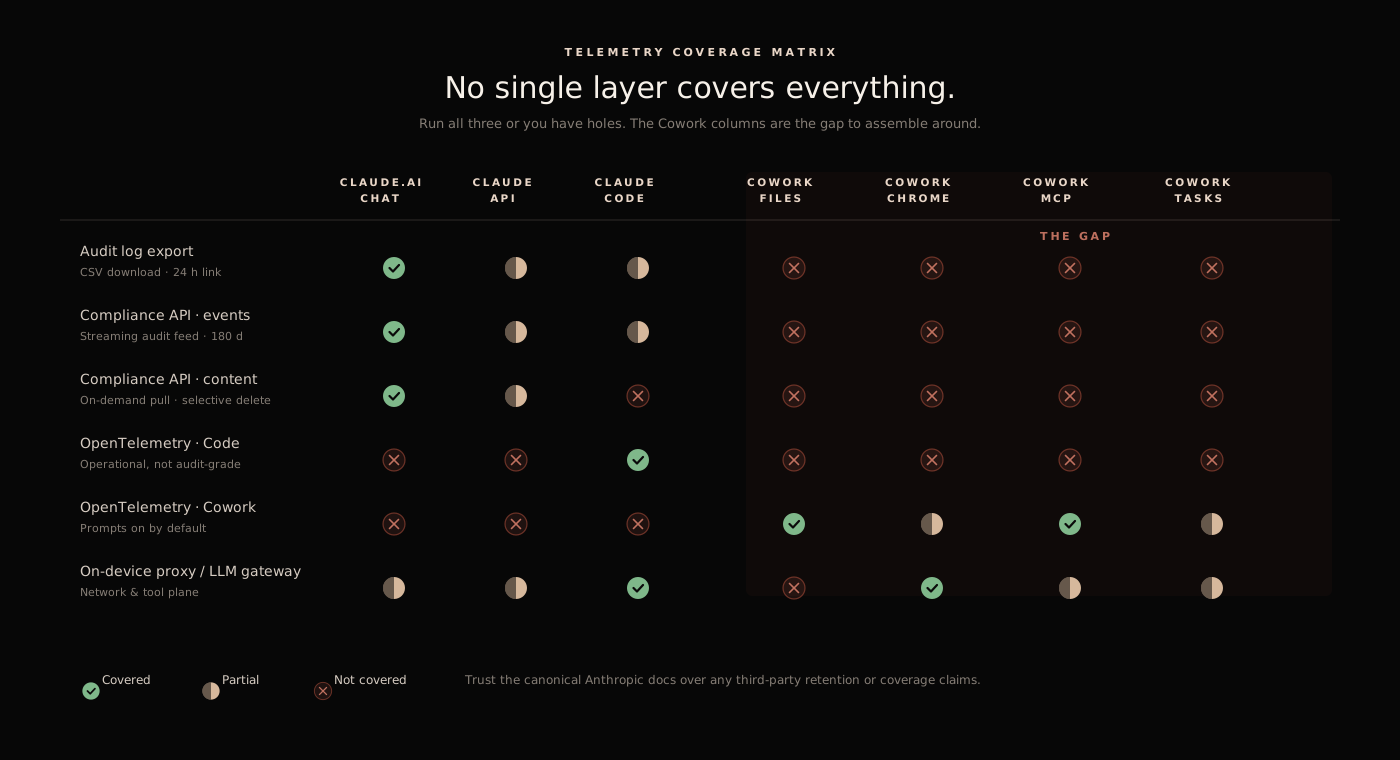
- The API supplies retained evidence. OpenTelemetry supplies a live operational stream. Inline hooks, gateways, proxies, and endpoint controls enforce policy.
- Cowork session visibility has improved, but Cowork remains outside Anthropic's BAA and its computer-use path still needs separate controls.
Anthropic expanded the Compliance API in August 2026. Remote Cowork sessions arrived on August 3, local Cowork and Claude Code sessions followed on August 11, and the session endpoints left beta on August 26. That sequence changed the enterprise audit picture: supported agent sessions can now have a central transcript, even when the work happened on a user's machine.
The API is still an evidence system rather than a permission boundary. It can tell an investigator what a supported session recorded. It does not, by itself, stop a risky upload, constrain a browser action, or block a tool call. This guide maps the current coverage and the controls needed around it. For the execution side, see How to Secure Claude Cowork; for the product decision, see Claude Cowork vs Claude Code.
API Coverage#
The current Compliance API documentation describes four distinct data sets:
| Data set | What it provides | Key limitation |
|---|---|---|
| Activity Feed | Administrative, identity, configuration, and resource activity across linked organizations | Event records are not full session transcripts |
| Organization data | Users, roles, groups, linked organizations, and effective settings | Availability depends on organization and key type |
| Claude.ai content | Chats, messages, files, projects, and project attachments | Content follows the organization's retention and deletion state |
| App and agent sessions | Supported local and remote Cowork sessions, local Claude Code sessions, and other listed app surfaces | Coverage depends on product surface, authentication path, and capture settings |
Every endpoint is documented under /v1/compliance/* and uses an API key plus the anthropic-version header. A Compliance Access Key can reach the full API when granted the necessary scopes. An Admin API key from Claude Console reaches the Activity Feed only.
See how your AI systems hold up under real attacks
General Analysis maps AI applications and agents, red teams prompts, retrieval, tools, MCP servers, browser actions, permissions, and business workflows, then turns findings into evidence your team can reproduce and retest.
Enablement and Key Scopes#
For a Claude Enterprise tenant, the Primary Owner enables the API at claude.ai → Organization settings → API. The setting applies at the parent organization level and cascades to linked organizations. Anthropic's setup guide then lets an authorized owner create a scoped Compliance Access Key.
| Scope | Use |
|---|---|
read:compliance_activities | Read the Activity Feed |
read:compliance_user_data | Read users, chats, files, projects, and session transcripts |
delete:compliance_user_data | Delete supported chats, files, and projects |
read:compliance_org_data | Read organization metadata and effective settings |
Use separate read and delete keys when deletion is part of a workflow. Scopes cannot be changed after key creation, and the full secret is displayed once. Store it in a secrets manager, restrict which service can read it, and ingest the compliance_api_accessed activity so queries against compliance data have their own audit trail.
The timing of enablement matters. While the setting is off, new Activity Feed events are not recorded. Local Cowork and Code transcript capture also stops, and those missed transcripts cannot be reconstructed after the setting is turned back on.
Activity Feed and Content#
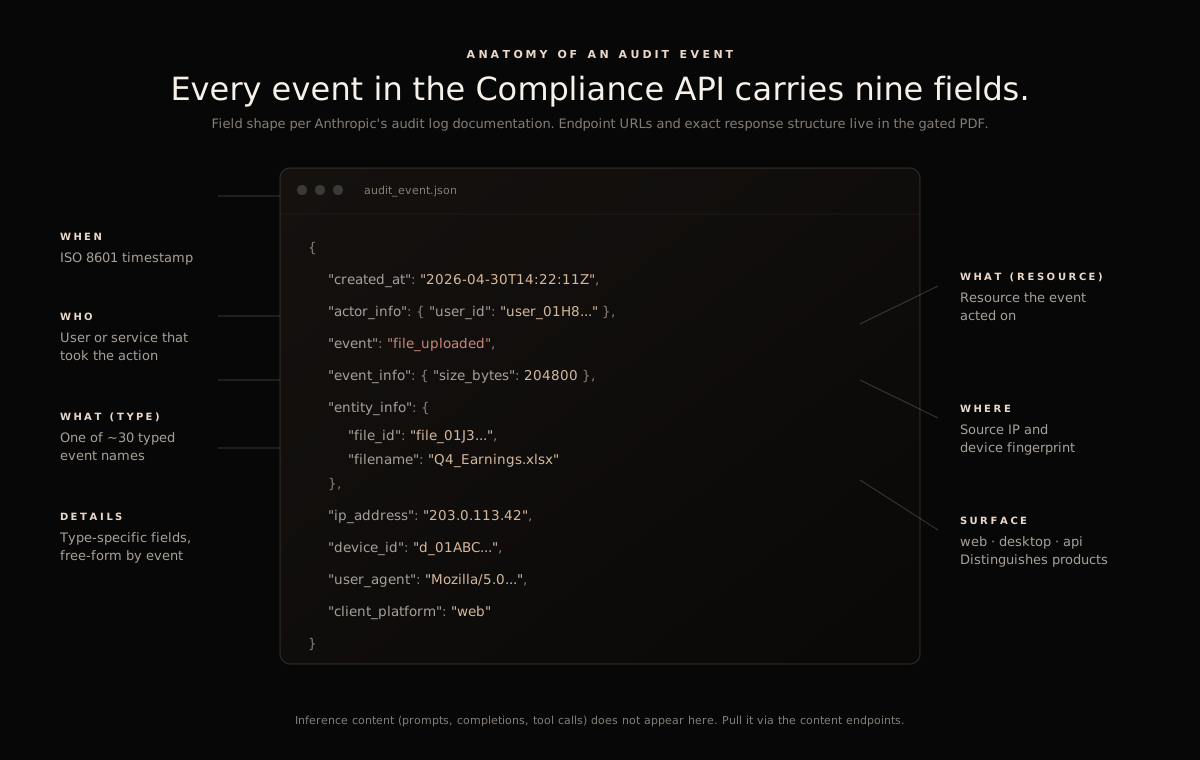
The Activity Feed answers questions such as who changed an organization setting, invited a user, created a resource, or accessed the Compliance API. Use a stable user identifier to correlate events with identity and downstream SIEM records. Poll with an overlap window so late-arriving events are not missed, and preserve source endpoint, query parameters, collection time, and a content hash when chain of custody matters.
The content endpoints answer a different class of question. They retrieve Claude.ai chats, files, projects, attachments, and supported app-session transcripts. A legal or security workflow can use those records for investigation, eDiscovery, data-subject access, or targeted deletion where the API exposes deletion.
An Activity Feed row cannot stand in for a transcript, and raw event volume says little about completeness. Reconcile the feed and each content collection separately.
Cowork and Claude Code Session Transcripts#
The session endpoints split local and remote execution:
| Session type | Current coverage |
|---|---|
| Local Cowork | Sessions on users' machines while signed in with a Claude Enterprise account and capture is enabled |
| Remote Cowork | Sessions started on claude.ai web or mobile in Anthropic-managed environments |
| Local Claude Code | Supported CLI and Claude Desktop sessions signed in with the Enterprise account |
| Excluded Code paths | Claude Code on the web, Code authenticated through the Claude Platform, and sessions on Bedrock or Vertex AI |
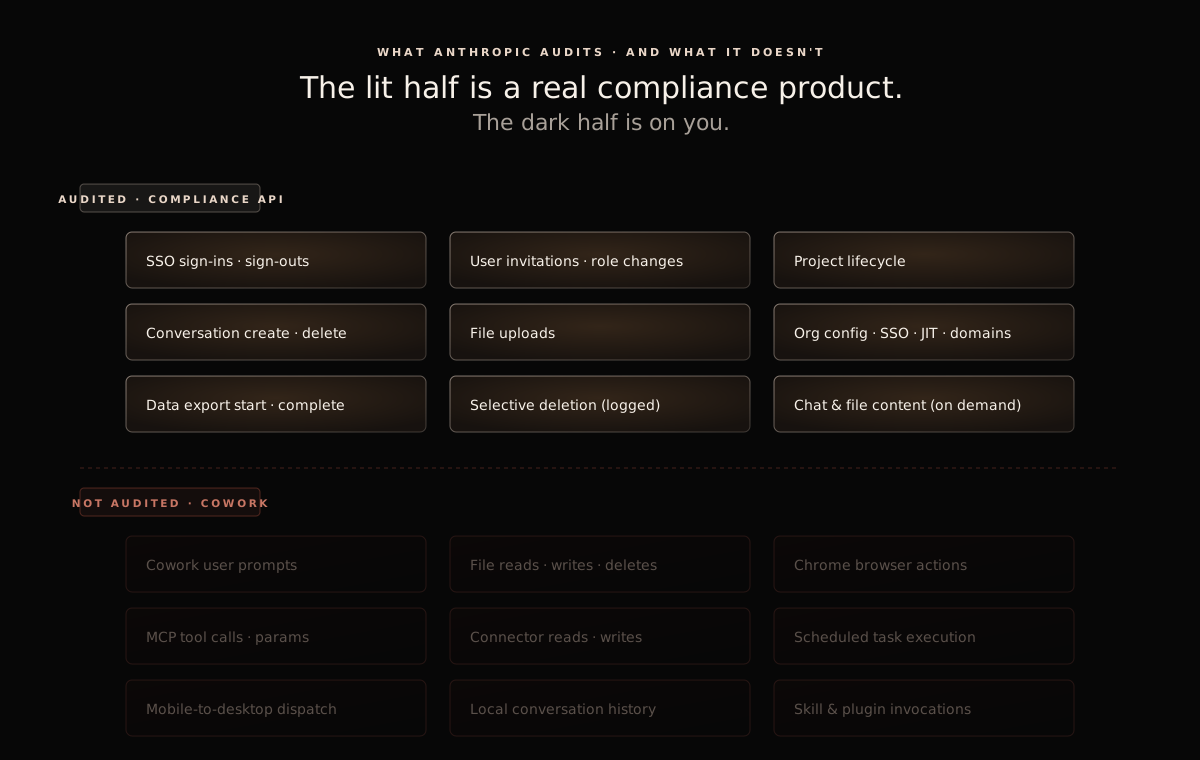
A session transcript can contain user prompts, assistant responses, and tool activity. It does not contain every piece of execution context. Anthropic's integration design guide lists exclusions including thinking blocks, images and other binary content, the local system prompt, tool definitions, MCP server configuration, and local activity never sent to Anthropic.
Local session capture also interacts with privacy configuration. The Compliance API does not capture local sessions under ZDR or from organizations with HIPAA readiness enabled. That is separate from the product-level BAA question: Cowork itself is not covered by Anthropic's BAA. A security team should therefore treat Cowork transcripts as useful evidence, while keeping PHI out of the product.
Retention#
Do not carry the audit-log export's old retention assumption into the API. Anthropic's current retention documentation lists separate horizons:
| Data | Retention |
|---|---|
| Activity Feed | Six years |
| Claude.ai chats, files, and projects | Organization retention policy, unless deleted earlier |
| Local app-session transcripts | Six years by default, or the organization's finite conversation-retention period |
| Remote Cowork transcripts | Six years |
Shortening a finite retention period can make older local transcript messages unavailable immediately. Increasing it later does not restore expired content. Export records that must outlive the source retention period, then preserve provenance and access controls around the copy.
Compliance API, OpenTelemetry, and Enforcement#
Each layer answers a different operational question:
| Layer | Primary question | Typical output |
|---|---|---|
| Compliance API | What retained activity and content can we retrieve? | Activity events, organization state, content, session transcripts |
| OpenTelemetry | What is the agent doing now, and how is it performing? | Streamed operational events, metrics, cost, token, host, prompt, and tool signals |
| Inline and endpoint controls | Should this action be allowed to proceed? | Allow, deny, redact, require approval, or isolate |
| Downstream systems | What effect actually occurred? | Browser, SaaS, proxy, endpoint, MCP, and business-system records |
Cowork OpenTelemetry can include sensitive prompt and tool data. Route it through a collector that can redact fields before wider distribution. Correlate its prompt and session identifiers with Compliance API records, endpoint timestamps, and downstream application events.
For real-time policy, use a control that participates before the effect. Anthropic's inference hooks can hold governed prompts for an external allow-or-deny verdict. Gateways and proxies can decide on network and tool traffic they actually see. Endpoint and browser controls cover device actions. Human approval remains appropriate for irreversible actions, external sends, permission changes, and production operations.
Known Coverage Gaps#
One successful API request proves that the integration works. It does not prove that every relevant session or action is present. Check the exclusions that apply to the deployment:
- Capture must be enabled before local activity occurs.
- Unsupported product and authentication paths remain outside the session endpoints.
- Local-only actions that never reach Anthropic are absent.
- Session transcripts omit thinking blocks, binary content, some system context, tool definitions, and MCP configuration.
- Content can disappear under retention policy or user and administrator deletion.
- The API records activity after the fact and cannot replace runtime policy enforcement.
- Cowork session availability does not create BAA coverage for Cowork.
Turn each applicable gap into a test. Start a known session, run representative file, browser, connector, MCP, and computer-use actions, then prove which records appear in the API, OTel collector, endpoint platform, proxy, and downstream SaaS logs.
Rollout Plan#
- Map surfaces and identities. Inventory Claude.ai, Cowork, Code, API, cloud-provider, mobile, and beta-product use. Record how each user authenticates.
- Enable capture before the pilot. Have the Primary Owner enable the Compliance API, then confirm a test activity and local session appear.
- Create least-privilege keys. Separate Activity Feed ingestion, content retrieval, and deletion duties where possible.
- Build overlapping ingestion. Poll the Activity Feed with a cursor and overlap window. Alert on gaps, repeated failures, unexpected disablement, and use of compliance keys.
- Export session evidence. Retrieve representative local and remote sessions, record provenance, and validate retention behavior.
- Correlate live telemetry. Stream Cowork and Code OpenTelemetry into a controlled collector and join it to session, user, device, and downstream-system identifiers.
- Test enforcement separately. Exercise inference hooks, proxy or gateway policy, MCP controls, browser management, endpoint restrictions, and approval flows.
- Write the exceptions down. Document unsupported paths, retention choices, BAA exclusions, and the owner who accepts each remaining risk.
Key Takeaways#
The August 2026 session endpoints changed the Cowork audit story. Supported Cowork and Claude Code sessions now have a central retrieval path through the Compliance API, and the endpoint reference is public.
What an investigator can reconstruct still depends on when capture began, how the user authenticated, the retention setting, transcript omissions, local-only activity, and downstream effects. Use the Compliance API for retained evidence, OpenTelemetry for a live agent stream, and inline plus endpoint controls for enforcement.
Compliance API FAQ
Answers on current Claude Compliance API coverage, setup, Cowork sessions, and the difference from OpenTelemetry.
- What does the Claude Compliance API cover?
It exposes the organization Activity Feed; user, role, group, and effective-setting data; Claude.ai chats, files, and projects; and supported session transcripts from Cowork, Claude Code, Claude Science, and Claude for Microsoft 365. Content and session endpoints require a Compliance Access Key with the relevant scope. Coverage differs by product surface, authentication path, retention setting, and organization configuration.
- Does the Compliance API cover Claude Cowork?
Yes. It returns transcripts for supported local Cowork sessions and remote Cowork sessions started on claude.ai web or mobile. Local capture starts only after the Primary Owner enables the API, and missed periods cannot be recovered. Transcripts also omit documented material such as thinking blocks, binary content, tool definitions, and MCP server configuration.
- How do I enable the Compliance API?
For Claude Enterprise, the Primary Owner enables it at claude.ai → Organization settings → API, then creates a Compliance Access Key with the minimum required scopes.
read:compliance_activitiesreads the Activity Feed;read:compliance_user_datareads chats, files, projects, and session transcripts. The endpoint reference is public in Claude Platform Docs. - Is the Compliance API a runtime security control?
No. It retrieves retained records after activity occurs. Cowork OpenTelemetry and Claude Code monitoring stream operational events to a collector you run, while inference hooks, gateways, proxies, endpoint controls, and approval systems can make allow-or-deny decisions before an action completes.
Runtime Enforcement#
General Analysis AIDR joins Compliance API and OpenTelemetry records with prompts, file access, browser actions, MCP and plugin calls, shell commands, approvals, and downstream effects. It uses that context for detection and to stop risky actions before they complete.