
Shadow AI Definition#
Shadow AI is any AI tool, model, agent, extension, MCP server, SaaS AI feature, or automation workflow used outside the organization's approved identity, data, retention, policy, and audit controls.
Common shadow AI surfaces:
- An OpenClaw-style browser-control agent that can read pages, click through SaaS apps, and move data into a model-backed workflow.
- A personal AI workspace used to summarize customer records, legal documents, support tickets, source code, or finance files.
- A desktop agent with MCP or tool connectors that can read local files, browser profiles, credentials, or business APIs.
- A local runtime or downloaded model run against production logs, transcripts, source repos, or exported tickets.
- A SaaS copilot, meeting bot, document assistant, or marketplace app enabled before security and legal review.
- A sanctioned AI product used through the wrong tenant, a personal account, weak retention settings, or missing DLP controls.
Detection starts with a simple record: user, device, app, AI surface, account mode, data type, action, destination, policy decision, and owner.
See how your AI systems hold up under real attacks
General Analysis maps AI applications and agents, red teams prompts, retrieval, tools, MCP servers, browser actions, permissions, and business workflows, then turns findings into evidence your team can reproduce and retest.
Detection Questions#
A useful program answers these questions before it blocks anything:
| Question | Why it matters |
|---|---|
| Which AI tools are in use? | Builds the inventory: consumer chatbots, API providers, extensions, browser-control agents, desktop agents, local models, and SaaS AI features. |
| Which identities use them? | Separates managed enterprise accounts from personal accounts and anonymous sessions. |
| Which devices generate usage? | Determines whether endpoint, browser, or network controls can enforce policy. |
| What data is being sent? | Distinguishes harmless experimentation from customer data, source code, credentials, PHI, PCI, or legal material. |
| What action does the AI take? | Agents and extensions may read, write, click, send, or invoke tools. Detection should cover actions as well as prompts. |
| What policy should apply? | Turns detection into a runtime decision: allow, warn, redact, require justification, require approval, redirect, block, or investigate. |
| Where can that policy run? | Separates inline controls in the browser, SWG, gateway, endpoint, or MCP gateway from log-only alerting. |
| Is there an approved alternative? | Governance works better when detection can route users to a sanctioned path. |
Detection Layers#
| Tool | What it covers | Enforcement |
|---|---|---|
| Browser extension | Page context, prompt boxes, copy-paste, file uploads, browser AI extensions, browser-control agents | Inline for managed browser actions |
| SWG endpoint agent | Managed-device web egress on any network, AI destinations, uploads, personal-account access | Inline for routed web traffic |
| Network/SWG proxy | DNS, SNI, HTTP metadata, server egress, API calls, traffic volume, bypass detection | Inline only when traffic is routed through it |
| CASB/SaaS logs | OAuth grants, SaaS AI features, marketplace apps, admin logs, file events | Mostly log-only; some revocation/blocking through API controls |
| Endpoint agent | Local models, desktop agents, MCP configs, package installs, processes, file access | Inline only if the agent supports prevention |
| MCP gateway/tool proxy | MCP server registration, tool calls, arguments, outputs, file/API scopes | Inline for routed tool calls |
| AI gateway | Sanctioned model API calls, prompts, responses, files, tool calls, cost, model policy | Inline for routed model traffic |
Coverage Matrix#
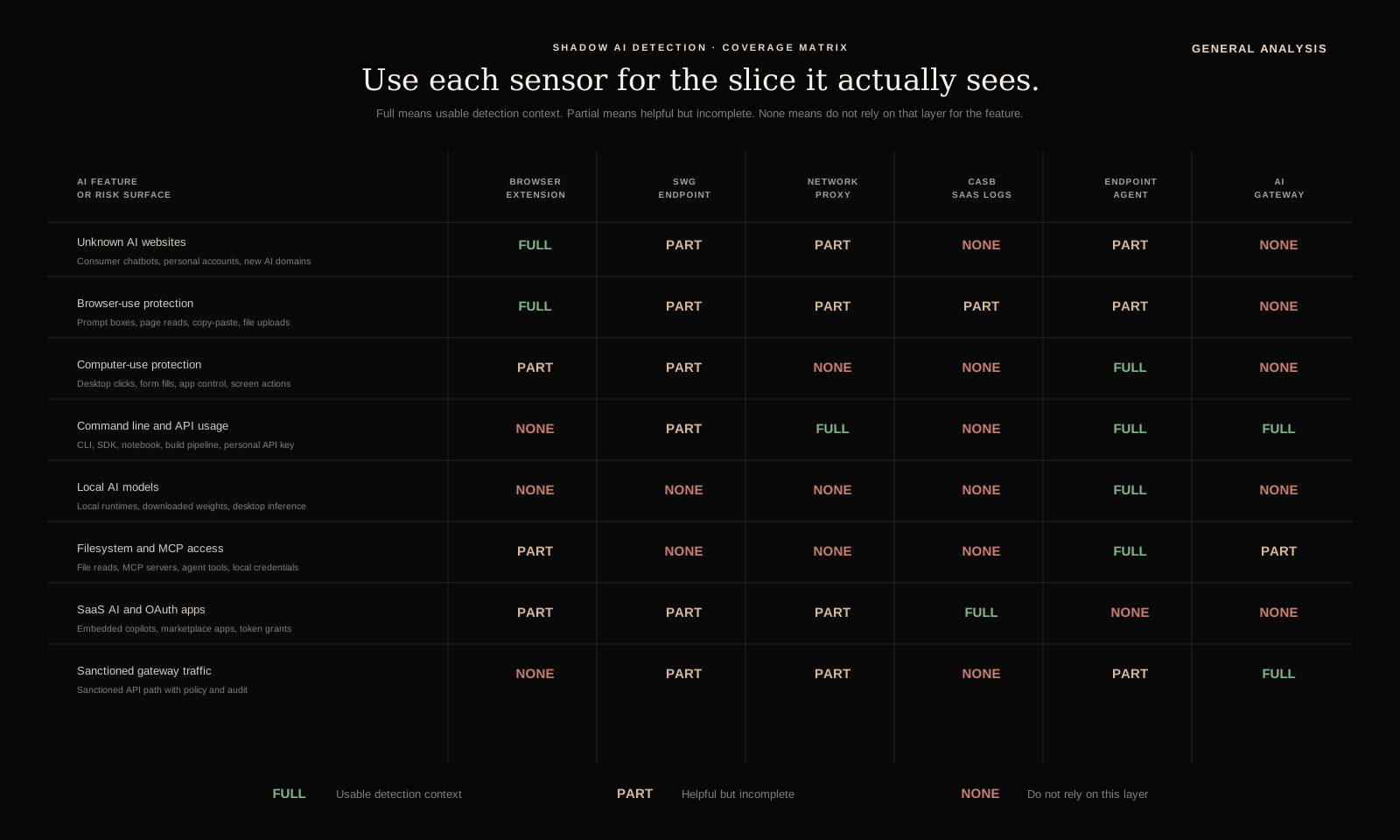
Read the matrix as a deployment map. The first column is the AI surface to cover. The columns are the tools above. Full means usable context. Partial means useful but incomplete. None means that layer should not be relied on for that surface.
Which control should you use first?#
| Primary problem | First layer | Second layer | Why |
|---|---|---|---|
| Employees pasting sensitive data into consumer AI sites | SWG endpoint agent | Browser extension | SWG gives immediate managed-device coverage; browser telemetry adds page and prompt context. |
| AI extensions reading CRM, support, HR, or legal pages | Browser extension | CASB/SaaS logs | The browser sees the page-level behavior; CASB confirms app grants and enterprise identity. |
| Developers using personal model APIs from laptops | Endpoint agent | Network/SWG proxy | The endpoint agent sees SDKs, CLIs, agent configs, and local credentials; network confirms egress and volume. |
| Local models or desktop agents reading files | Endpoint agent | AI asset inventory workflow | Network controls may see nothing; local process and file-access telemetry are the core signal. |
| Agents using MCP servers or tools | MCP gateway/tool proxy | Endpoint agent | The MCP gateway can approve, deny, log, and scope tool calls; the endpoint agent finds bypassed local configs. |
| Approved apps calling external LLMs | AI gateway | Network/SWG proxy | Gateway gives prompt, model, tool, and policy audit; network catches bypasses around the gateway. |
| Unknown AI SaaS features turning on inside approved apps | CASB/SaaS logs | Browser extension | SaaS logs see admin changes, OAuth grants, and marketplace installs; browser telemetry sees actual usage context. |
| Servers making unexpected inference calls | Network/SWG proxy | AI gateway | Egress logs find the anomaly; gateway migration creates durable policy and audit. |
Detection vs. Enforcement#
The most important operational distinction is whether a layer is inline or log-only. Inline controls can make a decision before data leaves or before an action executes. Log-only controls tell you what happened after the fact. Each supports a different promise.
| Layer | Real-time interception? | What it can stop before it happens | What is usually after-the-fact |
|---|---|---|---|
| Browser extension | Yes, if deployed with blocking permissions in the managed browser | Copy-paste into AI fields, file uploads, extension activation on sensitive pages, risky prompts before submission | Historical page visits and extension inventory if running in observe-only mode |
| SWG endpoint agent | Yes, for managed-device web traffic routed through the agent | Requests to AI destinations, uploads, personal-account access, policy-violating web egress | Traffic outside the managed endpoint or outside inspected protocols |
| Network/SWG proxy | Yes, only when traffic is routed inline through the proxy | Egress to AI services, uploads, API calls, server-side inference traffic | DNS/firewall/NetFlow/SIEM logs that are collected passively |
| CASB/SaaS logs | Usually no | Some CASB products can revoke OAuth grants or block app installs through API integrations; prompt/action interception depends on the SaaS and CASB integration | OAuth grants, marketplace installs, SaaS AI feature usage, admin changes |
| Endpoint agent | Sometimes | Process execution, package installs, local server startup, file access, or app launch if the agent supports prevention | Inventory, local model discovery, agent and plugin detection, historical process and file events |
| MCP gateway/tool proxy | Yes, for routed MCP and tool calls | Tool invocation, arguments, output handling, file/API scope, destructive actions, credential access | Direct local tool use that bypasses the gateway |
| AI gateway | Yes, for sanctioned model traffic routed through it | Prompts, file inputs, responses, tool calls, model selection, policy-violating requests | Any AI use that bypasses the gateway |
This distinction changes the incident response story. If you discover shadow AI only through logs, the data may already be in the vendor's system. The next step is containment: revoke tokens, block the destination, notify the data owner, open vendor retention review, and decide whether the workflow becomes approved or banned. If the control is inline, the policy can warn, redact, require justification, require approval, redirect to an approved tool, or block before the data crosses the boundary.
That is why mature programs combine both. Log-only sources are excellent for discovery and coverage measurement. Inline controls are what turn discovery into prevention.
Detection Tool Details#
Browser extensions#
Browser extensions are attractive because so much AI usage happens in the browser: consumer chatbots, SaaS copilots, search assistants, document summarizers, meeting note tools, and browser-native agents. A well-designed extension can observe page context, DOM state, copy-paste, and upload intent.
What a browser extension can detect:
- Visits to known AI web apps and embedded AI widgets.
- Prompt box entry, copy-paste into text areas, and drag-and-drop uploads.
- File upload controls and selected file metadata before upload.
- DOM context: which SaaS page the user was on when an AI extension activated.
- Browser extension inventory: which AI extensions are installed, enabled, or granted broad permissions.
- Some assistant actions: summarization, page reading, form filling, or content insertion into SaaS apps.
That context is powerful. If a user opens a customer record in Salesforce and an AI extension reads the page, the network layer may only see a request to the extension vendor. The browser layer can see that the active page contained customer data and that the extension was invoked from that page.
The tradeoffs are real.
| Strength | Limitation |
|---|---|
| Best semantic context for browser workflows | Does not cover native desktop apps, CLI tools, local models, or non-browser agents |
| Can detect pre-upload behavior before data leaves | Requires managed browser deployment and extension permissions |
| Can connect AI use to the active SaaS page | Raises privacy and employee-monitoring questions that need clear policy |
| Can classify copy-paste and file-upload intent | Browser APIs vary; coverage differs across Chrome, Edge, Safari, and Firefox |
| Can inventory risky AI extensions | Cannot inspect encrypted network payloads outside the browser |
Use browser extensions when page context matters: CRM, support consoles, legal review, HR systems, source-control UIs, data rooms, and internal admin apps. Treat them as the high-context browser layer in a broader control stack.
SWG as an endpoint agent#
A secure web gateway deployed as an endpoint agent is often the highest-leverage starting point. The endpoint agent keeps protection active when the laptop leaves the office network, sends web traffic through the SWG policy plane, and can apply destination classification, data-loss rules, TLS inspection, upload controls, and user-based policy.
For shadow AI, the endpoint agent can answer the basic inventory questions quickly:
- Which managed users visit AI destinations?
- Which AI categories are growing week over week?
- Which teams upload files to AI services?
- Which personal accounts or anonymous sessions appear?
- Which traffic bypasses sanctioned AI gateways?
- Which AI vendors are being used before procurement has reviewed them?
It also provides an enforcement point: warn, coach, allow, block, isolate, require justification, or redirect to an approved AI service.
The weak point is context. A SWG can identify a POST request to an AI service and may inspect the payload if TLS inspection is enabled and legally appropriate. AI-specific classifiers help separate harmless prompts from prompts containing customer PII, source code, or privileged legal strategy. Category blocking is crude, and generic payload inspection creates noisy DLP alerts.
| SWG endpoint agent does well | SWG endpoint agent does poorly |
|---|---|
| Covers managed laptops on any network | Misses personal devices and unmanaged browsers |
| Enforces policy before upload leaves the device | Coverage gap for local models and native apps outside inspected web paths |
| Gives user, device, destination, volume, and time | Often lacks page-level browser context |
| Integrates with DLP and identity policy | TLS inspection has privacy, performance, and breakage costs |
| Can redirect users to approved tools | URL/category lists lag new AI products and embedded AI features |
The best pattern is SWG plus an AI-specific policy engine. Treat the SWG as the transport control and the AI classifier as the semantic control. The SWG decides where traffic flows. The AI policy layer decides whether the content and workflow are acceptable.
Network detection#
Network telemetry is still useful, especially for initial discovery. DNS logs, firewall logs, proxy logs, NetFlow, SNI, JA3/JA4 fingerprints, and HTTP metadata can identify AI destinations and unusual data movement. This catches cases no browser extension will see: headless scripts, command-line API calls, server workloads, automation platforms, and unmanaged app integrations.
Good network detections for shadow AI include:
- First-seen connections to model providers, chatbot domains, AI coding tools, transcription services, summarization tools, and agent platforms.
- Large uploads to AI destinations, especially from departments that handle regulated data.
- API-like traffic to model endpoints from user laptops where approved backend services should be used.
- Repeated connections to consumer AI domains from privileged admin devices.
- DNS lookups for local model package registries, model hubs, or tunneling services used to expose local agents.
- Egress to AI services from servers that should not call external inference APIs.
Network detection is strongest for destinations, volume, and anomaly patterns. The destination chat.openai.com or claude.ai tells you a tool was used. Prompt-level risk needs payload inspection, browser context, or gateway logs. Modern AI surfaces embed requests in complex web apps and may use streaming protocols, browser storage, or backend fetches that are hard to classify reliably.
Use network telemetry for breadth: inventory, trend lines, suspicious volume, bypass detection, and server-side egress. Pair it with endpoint or browser telemetry for depth.
CASB and SaaS logs#
CASB and SaaS telemetry is where many organizations find shadow AI hiding inside approved SaaS. Approved SaaS products increasingly add AI features, and users often turn them on before security reviews the workflow.
Useful signals include:
- OAuth grants to AI apps and browser extensions.
- Marketplace app installs in Google Workspace, Microsoft 365, Slack, Salesforce, Notion, Atlassian, and GitHub.
- Enterprise AI feature enablement inside SaaS admin consoles.
- File export and sharing events followed by AI tool usage.
- Unusual third-party app scopes: read all email, read all files, write calendar, administer workspace.
- Personal-account usage where enterprise SSO should be required.
CASB logs are especially useful for identity. They answer "which account authorized this" better than raw network logs. Prompt and payload content usually needs browser, gateway, or endpoint telemetry, and consumer accounts outside enterprise identity require other controls.
Endpoint and local AI detection#
Local AI is a major blind spot for network-centric programs. Employees can run models locally, install AI desktop apps, use browser-control agents, add MCP servers, and invoke model APIs from scripts. Some of this traffic eventually hits the network. Some of it stays local.
Endpoint telemetry can detect:
- Installed AI desktop apps, browser-control agents, browser extensions, and command-line tools.
- Local model runtimes and model files.
- Package installs for agent frameworks, MCP servers, and AI SDKs.
- Processes listening on local ports for model serving or tool orchestration.
- Access patterns where an AI process reads sensitive directories, source repos, browser profiles, SSH keys, or downloaded files.
- MCP configuration files that grant agents access to local tools and services.
This layer matters because local agents collapse the distance between AI and data. A desktop agent with filesystem access can read the file directly, summarize it locally, call a tool, then send only the result somewhere else. Network logs may never see the sensitive source material.
The tradeoff is noise. Developer machines legitimately install AI SDKs, model packages, and local services. Detection must separate sanctioned development from unmanaged use. That usually means pairing endpoint detections with ownership metadata: department, repo, project, approved tool list, and business justification.
MCP gateways and tool proxies#
MCP gateways sit between agents and the tools they want to call. They cover tool and action risk: a model connected to filesystem, browser, database, Slack, GitHub, or internal API tools can exfiltrate data through tool arguments, tool outputs, or follow-on actions.
An MCP gateway should capture and enforce policy on:
- Server registration, tool manifests, tool descriptions, and granted scopes.
- Tool-call arguments before execution.
- Tool outputs before they return to the model.
- File reads, API calls, shell execution, browser actions, and write operations.
- Approval state, user identity, device identity, and business owner.
- Direct-to-tool bypasses found by endpoint telemetry.
The policy decisions are different from ordinary web blocking. A gateway might allow read-only file search, require approval for source-code export, redact secrets from tool output, block shell execution, or downgrade a tool from write access to read access. The useful control point is the tool boundary: before the agent touches the file, calls the API, writes the ticket, or sends data back to the model.
AI gateways for sanctioned usage#
An AI gateway gives the strongest control for approved AI usage because it can capture the actual prompt, response, model, tool call, latency, cost, user, app, and policy decision in one trace. Its coverage depends on traffic being routed through it.
Gateways are where detection turns into governance:
- Classify prompts and responses for PII, credentials, source code, regulated data, and policy violations.
- Enforce model allowlists and vendor routing.
- Log tool calls, function arguments, MCP invocations, and agent steps.
- Apply retention and redaction before prompts are stored.
- Attribute usage to business applications and people.
- Provide a sanctioned path that makes blocking unmanaged paths politically and operationally possible.
The gateway is the destination you want users and applications to move toward. SWG and browser detections find the bypasses. The gateway proves what compliant usage looks like.
Pros and cons by approach#
| Approach | Pros | Cons | Best fit |
|---|---|---|---|
| Browser extension | Highest browser context; sees page, prompt, copy-paste, uploads, and extension behavior | Narrow coverage; privacy-sensitive; browser-specific; can be bypassed by native apps or personal devices | High-risk browser SaaS workflows |
| SWG endpoint agent | Strong managed-device web coverage; works off-network; can enforce before upload | Needs TLS inspection and AI-aware classification; misses local/non-web usage | Enterprise first-line discovery and policy |
| Network/SWG proxy | Broad visibility across egress; useful for servers and unmanaged app patterns | Weak content semantics; coverage gaps for off-network endpoints outside agent routing | Inventory, anomaly detection, server-side egress |
| CASB/SaaS logs | Strong identity and OAuth visibility; finds AI inside approved SaaS | Limited prompt visibility; misses personal accounts | Third-party app governance and SaaS AI rollout |
| Endpoint agent | Finds local models, browser-control agents, MCP servers, desktop apps | Noisy on developer devices; weak prompt semantics | Local AI and agent/tool discovery |
| MCP gateway/tool proxy | Enforces policy on tool calls, arguments, outputs, and scopes | Requires agents to route tool use through it | MCP, filesystem, API, and agent-tool governance |
| AI gateway | Deepest prompt/action audit for sanctioned usage | No visibility into bypass traffic | Approved AI control plane |
Runtime Enforcement#
Visibility tells you where shadow AI is happening. Runtime enforcement prevents the bad outcome: data exfiltration, credential leakage, unapproved model use, unsafe tool calls, and agent actions outside policy. Build the system around two behavior streams: user behavior and model behavior.
| Behavior stream | Examples | Enforcement point | Typical decision |
|---|---|---|---|
| User behavior | Visiting unknown AI sites, pasting source code, uploading customer files, granting OAuth scopes | Browser extension, SWG endpoint agent, network proxy, CASB integration | Warn, block, redirect, require justification |
| Model behavior | Prompt asks for secrets, response includes PII, agent calls MCP tool, tool writes files, model routes around gateway | AI gateway, MCP gateway/tool proxy, endpoint agent, browser control layer | Redact, block, require approval, downgrade permissions |
| Data movement | File upload, prompt submission, copy-paste, API request, tool argument, connector sync | Browser, SWG, gateway, endpoint agent | Classify, redact, block, log |
| Identity and ownership | Personal account use, unknown OAuth app, unowned API key, unmanaged device | IdP, CASB, SWG, asset graph | Investigate, revoke, assign owner, expire exception |
The policy engine should make decisions before the risky step completes whenever the control is inline. For log-only sources, the same policy should create an investigation, revoke access, or update the asset inventory.
Common runtime policies:
| Policy | Runtime action |
|---|---|
| Source code or credentials sent to unreviewed AI service | Block or redirect to approved workspace |
| Customer PII pasted into personal AI account | Block, redact, or require approval |
| AI browser extension reads CRM, HR, support, or legal page | Warn, block, or require managed extension allowlist |
| MCP server requests broad filesystem access | Require approval and log tool manifest |
| Local AI process reads credential paths or sensitive repos | Alert, isolate process, or block file access |
| Model tries to call destructive tool | Require human approval outside the model |
| Approved app uses sanctioned AI gateway | Allow, classify, redact, and log |
Implementation#
Keep the implementation compact: normalize events, enrich them, enforce policy, then store the result in an asset graph.
Build five pieces:
- Sensors: browser extension, SWG endpoint agent, proxy logs, CASB exports, endpoint agent, AI gateway, and MCP gateway. Emit structured events with stable IDs.
- Normalization: map every source into one event schema. Deduplicate browser/SWG/gateway copies of the same upload or prompt.
- Classification: label destination, account mode, prompt risk, file type, data category, model provider, tool call, and action type.
- Policy engine: return allow, warn, redact, require justification, require approval, redirect, block, or investigate.
- Asset graph: link user, device, app, browser profile, process, extension, OAuth grant, model endpoint, MCP server, data category, and owner.
Minimum event schema:
- source type: browser extension, SWG agent, network proxy, CASB, endpoint agent, AI gateway, MCP gateway.
- visibility mode: inline, observe only, or log only.
- actor and device: user, group, department, device ID, management state.
- app context: browser tab, SaaS tenant, desktop app, process, service, or MCP client.
- AI surface: unknown AI site, browser use, computer use, CLI/API usage, local model, filesystem/MCP access, SaaS AI, AI gateway, MCP gateway.
- destination: domain, model provider, SaaS app, OAuth app, MCP server, tool name.
- data signal: file type, byte count, DLP label, PII, secret, source-code, or regulated-data flags.
- action: visit, paste, upload, prompt submit, API call, file read, tool call, OAuth grant, model start.
- policy decision: final action plus reason code.
Implementation notes:
- Browser extension: capture page context, prompt fields, paste events, and file selection before submission. Store raw prompt text only for policies that require it.
- SWG/proxy: classify AI destinations, personal-account usage, upload size, API paths, SDK user agents, and server-side model calls.
- Endpoint agent: inventory local models, browser-control agents, MCP configs, desktop AI apps, listening ports, model directories, and sensitive file access by AI processes.
- MCP gateway: broker MCP server access, log tool manifests, classify tool arguments and outputs, and enforce per-tool approvals.
- AI gateway: log sanctioned prompts, responses, files, model routing, tool calls, cost, and policy decisions with redaction.
- Correlation: combine same user/device/destination events into one asset. Link browser prompt plus SWG upload into one data-movement event. Link MCP config plus gateway tool call into one tool asset.
A minimal policy-as-code shape is enough:
id: block_regulated_upload_to_unreviewed_ai
when:
  ai_surface: ["unknown_ai_site", "browser_use"]
  action: ["upload", "prompt_submit"]
  destination.review_status: ["unknown", "unreviewed"]
  data_signal.any: ["customer_pii", "phi", "pci", "source_code", "credential"]
then:
  decision: "block"
  user_message: "Use the approved AI workspace for regulated or source-code data."
  create_case: true
Rollout Checklist#
Rollout Sequence#
Start with the asset inventory. Add blocking once ownership, data risk, and approved alternatives are clear.
- Inventory known AI destinations. Pull 30 to 90 days of SWG, DNS, proxy, firewall, CASB, and expense data. Group by tool, user, department, device, and data volume.
- Classify usage paths. Separate sanctioned enterprise accounts, tolerated experiments, unknown consumer tools, high-risk upload workflows, local developer tools, and server-side API calls.
- Deploy endpoint SWG policy. For managed devices, route web AI traffic through a policy plane that can warn, block, isolate, or redirect based on user and data type.
- Add browser context for high-risk apps. Use browser telemetry where the active page matters: CRM, support, HR, finance, legal, admin consoles, and source control.
- Scan endpoint AI assets. Inventory browser-control agents, AI desktop apps, local model runtimes, MCP servers, and package installs. Prioritize devices with privileged data access.
- Put agent tools behind an MCP gateway. Route approved MCP servers and high-risk tools through a policy point that can approve, deny, redact, and log tool calls.
- Move approved model usage behind an AI gateway. Give developers and business apps a sanctioned API path with prompt logging, redaction, model routing, and policy enforcement.
- Create a review workflow. Every recurring detection should become one of four things: approved asset, blocked tool, exception with expiry, or open investigation. Governance begins when detections have ownership and outcomes.
The sequence matters. Early blanket blocking pushes employees toward workarounds. Long-running observation needs a sanctioned path so the inventory turns into decisions.
Common Failures#
URL lists masquerading as strategy. AI vendors launch new domains constantly, and many AI features live inside ordinary SaaS domains. A static denylist catches the obvious tools and misses embedded AI.
Network-only confidence. Network logs are necessary and strongest as leads. Prompt-level risk needs browser context, payload inspection, endpoint telemetry, or gateway logs.
Ignoring browser extensions. Extensions can read pages inside approved SaaS tools. A user may never visit a chatbot site at all. The AI is sitting inside the browser, next to the data.
Ignoring local agents. Browser-control agents, MCP servers, and local model runtimes can read files directly. If your detection program only looks for uploads to web apps, it will miss the agentic workflows with the highest local data access.
No owner for detections. Security teams often produce lists of AI domains by user and stop there. Someone must decide whether each recurring workflow is approved, blocked, migrated, or investigated.
No sanctioned alternative. Users adopt shadow AI because it solves real work. A detection program needs an approved path that channels demand into governed usage.
Success Criteria#
A mature shadow AI detection program can answer these questions quickly:
- Which AI tools are used across the company, ranked by users, data volume, and risk?
- Which usage is enterprise-authenticated versus personal or anonymous?
- Which workflows involve regulated data, source code, credentials, or customer records?
- Which AI browser extensions have broad page-read permissions?
- Which endpoints run local models, MCP servers, AI desktop apps, or browser-control agents?
- Which applications use the sanctioned AI gateway, and which bypass it?
- Which MCP servers and high-risk tools are governed through an MCP gateway?
- Which detections became approved assets, blocked tools, or time-bound exceptions?
That is the standard to aim for: enough coverage to make decisions and prove them later.
Shadow AI Detection FAQ
Short answers on where to detect shadow AI, how browser extensions compare to SWG controls, and why network-only monitoring is incomplete.
- What is shadow AI?
Shadow AI is the use of AI tools, models, browser copilots, agent plugins, or automation services outside the organization's approved security, legal, and procurement process. The highest-risk cases involve confidential prompts, files, customer data, source code, or credentials moving into an unmanaged AI system with no retention, audit, or policy control.
- Can a secure web gateway detect all shadow AI?
A secure web gateway is one of the highest-leverage layers because it can classify managed-device web traffic and enforce policy before data leaves the endpoint. Coverage gaps remain around local model usage, personal devices, encrypted traffic outside inspection, browser extensions that operate inside allowed domains, and sanctioned AI apps whose risky behavior depends on page context or prompt content.
- Are browser extensions better than network monitoring?
They see different things. A browser extension can observe page context, DOM events, copy-paste, file upload controls, and AI assistant usage inside the browser. Network monitoring sees destinations, volumes, protocols, and sometimes payloads. Extensions provide richer context but have narrower coverage and higher privacy and deployment concerns. Network controls are broader but less semantically aware.
- What is the minimum viable shadow AI detection stack?
Start with SaaS discovery and SWG logs to inventory destinations, add endpoint or browser telemetry for managed devices, route approved model usage through an AI gateway, and define a review workflow that turns raw detections into an asset inventory. Ownership, risk rating, and policy decisions turn detections into usable governance.
We Built The AI Asset Control Plane#
General Analysis has already built the hard parts of this stack: the browser sensor, endpoint agent, SWG and network integrations, AI gateway, MCP gateway, prompt and upload classifiers, local-agent discovery, and the asset graph that ties usage back to identity, device, data type, model, workflow, and owner.
That is the part most shadow AI programs miss. A usable inventory connects domains, DLP alerts, owners, AI browser extensions, local models, personal API keys, and approved SaaS copilots into one record. The control plane turns those signals into decisions: approved asset, blocked tool, exception, or investigation.
What we can show you:
| Capability | What it does |
|---|---|
| Browser visibility | Detects AI prompts, uploads, extension behavior, and page context inside managed browser workflows. |
| Endpoint agent | Finds local models, AI desktop apps, browser-control agents, MCP servers, AI SDKs, and risky file-access patterns. |
| SWG and network integrations | Classifies AI egress, personal-account usage, uploads, bypass traffic, and server-side inference calls, with inline enforcement where traffic is routed through the control. |
| AI gateway | Routes sanctioned model usage with prompt logging, redaction, model policy, tool-call audit, and cost attribution. |
| MCP gateway | Brokers agent tool access with per-tool policy, approval, redaction, argument/output logging, and scoped permissions. |
| Asset graph | Connects user, device, app, model, data type, destination, workflow, and owner into one reviewable record. |
| Policy workflow | Converts detections into approvals, blocks, time-bound exceptions, and investigation queues. |
If you are trying to figure out where shadow AI is happening in your company, ask us. We built this because every serious enterprise AI rollout hits this exact detection and governance problem.