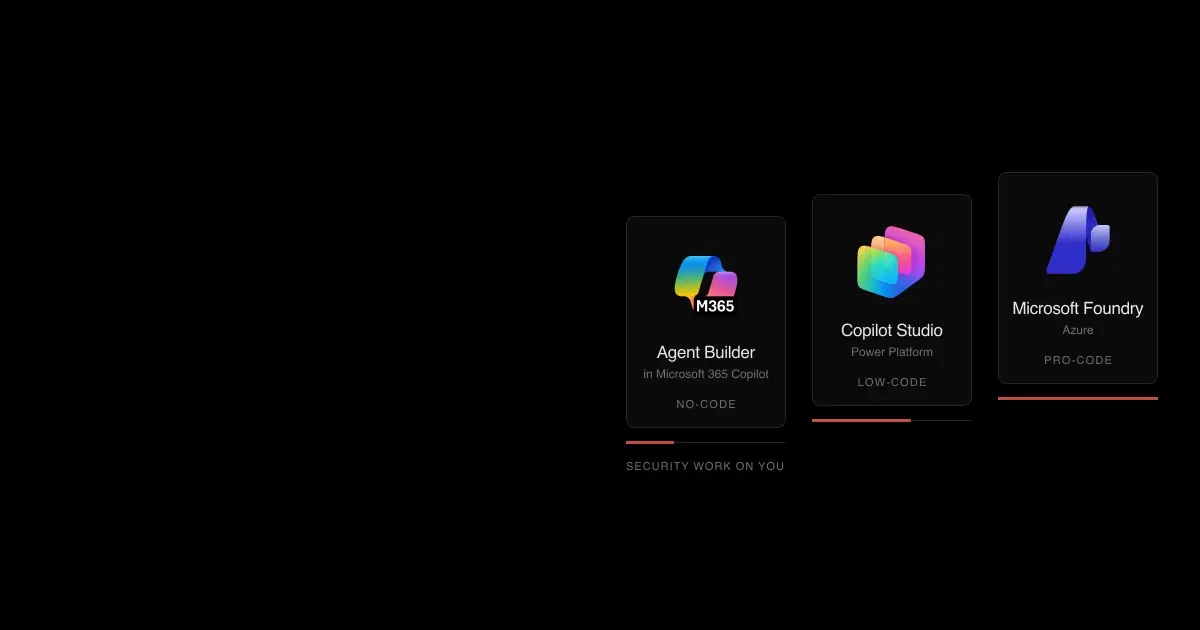

Microsoft offers three ways to build an AI agent, and they overlap enough to confuse buyers. Agent Builder lives inside Microsoft 365 Copilot and lets any employee build a simple agent in a chat window. Copilot Studio is the low-code platform for agents that connect to business systems. Microsoft Foundry, called Azure AI Foundry until late 2025, is the Azure platform where developers build agents in code.
The short version: choose by who builds and what the agent must reach. Agent Builder agents answer as the signed-in user from Microsoft 365 content. Copilot Studio agents add connectors, actions, triggers, and channels. Foundry agents can do anything you code, inside networks you control. Each step up adds capability and moves more of the security work onto you.
Agent Builder vs Copilot Studio vs Microsoft Foundry: quick comparison#
 Agent Builder |  Copilot Studio |  Microsoft Foundry | |
|---|---|---|---|
| Who builds | Any employee, in Microsoft 365 Copilot or Teams | Makers and Power Platform developers | Professional developers |
| What you build | Declarative agents: instructions, knowledge, a few built-in capabilities | Agents with topics, tools, triggers, and flows, on three runtimes ("harnesses") | Prompt agents and hosted agents running your own container. The visual workflow designer (preview) retires December 1, 2026, in favor of code |
| Where it's governed | Microsoft 365 admin center | Power Platform admin center and environments | Azure RBAC, Azure Policy, and the Foundry portal |
| Knowledge | SharePoint, OneDrive, email, Teams, Copilot connectors, websites, uploaded files | SharePoint, Dataverse, Azure SQL, websites, uploaded documents, Salesforce, ServiceNow, connectors | Foundry IQ knowledge bases, file search, Azure AI Search, and any API you call |
| Actions | None authored in Agent Builder | Power Platform connectors, HTTP, MCP servers, agent flows, computer use | MCP, OpenAPI, A2A, Azure Functions, code interpreter, browser automation |
| Running without a user | Scheduled prompts, rolling out from mid-November 2026 | Event triggers and autonomous agents | Hosted agents, routines, and autopilots (preview) |
| Identity | Runs as the signed-in user; no Entra agent identity | Entra agent identity per agent; tools use end-user or maker credentials | Entra agent identity per agent, starting with no permissions |
| Network isolation | None; a Microsoft 365 service | Limited: IP firewall in preview, VNet for some connectors | Private endpoints, your own VNet, or a managed VNet |
| Pricing basis | Included with Microsoft 365 Copilot; metered for unlicensed users' work data | Copilot Credits | Azure consumption: models, tools, hosted compute |
Sources: Microsoft Learn pages for Agent Builder, Copilot Studio harnesses, and Foundry Agent Service, checked November 6, 2026.
See what your Microsoft agents are doing
General Analysis AI Detection and Response (AIDR) integrates with Agent Builder, Copilot Studio, and Microsoft Foundry to give security teams observability across all three: what people are doing with agents, and which agents, data sources, connectors, and tools are connected to what.
What's the difference between Agent Builder and Copilot Studio?#
Agent Builder is the lightweight option, and Microsoft has renamed it more than once: the Copilot Studio agent builder, Copilot Studio Lite, and now Agent Builder in Microsoft 365 Copilot. It builds declarative agents that run on Microsoft 365 Copilot's orchestrator. Makers describe the agent, pick knowledge sources, and share it. They can't add actions that call external services. From mid-November 2026 it also replaces SharePoint's agent creator, which makes it the default no-code builder across Copilot, Teams, SharePoint, and OneDrive.
Copilot Studio is a full low-code platform. Agents can call Power Platform connectors and MCP servers, run agent flows, respond to event triggers, and publish to channels including websites, WhatsApp, and Facebook. Since 2026 it runs agents on more than one harness: the standard harness for topic-based and generative agents, the Microsoft Copilot harness (formerly the GitHub Copilot harness) for reasoning-heavy agents with skills and memory, and a Customer Conversation harness for service scenarios.
Copilot Studio is part of Power Platform, Microsoft's low-code family for business staff, alongside Power Apps for internal business apps, Power Automate for workflows, and Power BI for dashboards. They share connectors, data policies, and environments, which Microsoft describes as spaces "to store, manage, and share your organization's business data, apps, chatbots, and flows" (environments). Much of that business data sits in Dataverse, the database underneath Power Platform. Dynamics 365, Microsoft's CRM and ERP suite, stores its data there too, and access follows Dataverse's own security roles, separate from SharePoint permissions (what is Dataverse). Connecting an agent to Dataverse therefore connects it to the company's business records, often including CRM data. Copilot Studio also writes its conversation transcripts there (transcript controls).
When an Agent Builder agent outgrows its limits, Copy to Copilot Studio creates a new Copilot Studio agent from a snapshot. Instructions, SharePoint knowledge, and website knowledge carry over. Copilot connectors, uploaded files, email, and Teams knowledge don't, and the original agent stays where it was (copy to Copilot Studio). Governance changes with the move: Agent Builder is managed in the Microsoft 365 admin center, Copilot Studio in the Power Platform admin center, and their sharing limits are separate settings.
Copilot Studio vs Azure AI Foundry (Microsoft Foundry): when to use which#
The dividing line is whether you want to own an Azure deployment.
Choose Copilot Studio when makers who don't write code need agents in Teams or Microsoft 365, the agent mostly calls business systems that already have Power Platform connectors, and your administrators already govern Power Platform with environments and data policies.
Choose Foundry when developers need custom code or their own agent framework, the agent must run inside a private network, you need specific models or evaluations in a CI/CD pipeline, or the agent will be one service among others in an Azure architecture.
They also work together. Copilot Studio can call Foundry agents as connected agents, in preview, and supports the Agent2Agent protocol (connected agents). Foundry can publish agents to Microsoft 365 Copilot and Teams (publish from Foundry). A common pattern is a Copilot Studio front end for employees with a Foundry agent doing the specialized work behind it. That pattern adds a trust boundary in the middle, and the security sections below apply to both sides.
How widely is each platform used?#
| Platform | Latest Microsoft figure | What it counts |
|---|---|---|
| Agent Builder | Over 30 million paid Microsoft 365 Copilot seats (July 29, 2026) | Licensed Copilot users, who get Agent Builder included. Microsoft publishes no Agent Builder count |
| Copilot Studio | More than 230,000 organizations, including 90% of the Fortune 500 (April 30, 2025) | Organizations that have ever used it. Microsoft hasn't updated the count since |
| Microsoft Foundry | Over 120,000 customers, with revenue more than tripling year over year (October 28, 2026) | All Foundry customers, including model API use. Foundry Agent Service alone had 14,000 customers in July 2025 |
Since 2026, Microsoft has mostly reported Copilot Studio and Agent Builder together: "Nearly 90% of the Fortune 500 now have active agents built with our low-code/no-code tools" (April 29, 2026). Across all three builders and some third-party platforms, Agent 365 had over 50 million agents in its registry by October 2026, a count of registered agents rather than active ones. The figures use different units, so they can't rank the platforms against each other. They do show that most Fortune 500 companies already run low-code agents, so inventory comes before any platform choice.
Sources: Microsoft earnings call transcripts for April 30, 2025, July 30, 2025, April 29, 2026, July 29, 2026, and October 28, 2026.
How much does each cost?#
| Platform | How it's billed | Published list prices |
|---|---|---|
| Agent Builder | Included for Microsoft 365 Copilot license holders. Unlicensed Copilot Chat users can use instruction and web agents; work data such as SharePoint is metered in Copilot Credits through pay-as-you-go | Microsoft 365 Copilot is $30 per user per month (annual) |
| Copilot Studio | Copilot Credits from capacity packs or pay-as-you-go. Many standard harness features are free for Microsoft 365 Copilot users in authenticated Microsoft 365 channels; the Microsoft Copilot harness bills usage regardless of license, including while you build | $200 per 25,000-credit pack per month; $0.01 per credit pay-as-you-go |
| Microsoft Foundry | No charge for the agent runtime itself; you pay for model tokens, tools, storage, and hosted compute | Grounding with Bing is $14 per 1,000 transactions; hosted agents are $0.0994 per vCPU-hour plus $0.0118 per GiB-hour (East US) |
Sources: Copilot Studio pricing, Copilot Studio licensing, Power Platform pay-as-you-go meters, Foundry Agent Service pricing, and the Azure Retail Prices API, November 6, 2026. Prices vary by region and agreement.
Governance has its own cost. Agent 365, which adds policy templates, observability, and Defender agent protections across all three platforms, is $15 per user per month or part of Microsoft 365 E7.
Which is more secure: Agent Builder, Copilot Studio, or Foundry?#
None of them is safer by default. They fail in different places, and a platform with more controls also needs more configuration.
| Security question | Agent Builder | Copilot Studio | Microsoft Foundry |
|---|---|---|---|
| Who can talk to the agent? | People it's shared with in Microsoft 365 | Microsoft-authenticated users by default; makers can choose "No authentication" | Entra identities with an Azure role; published agents can open to the whole tenant |
| Whose permissions does it use? | The signed-in user's, except uploaded files, which every agent user can read | The user's for knowledge; end-user or maker credentials for tools; the author's for triggers | The agent's own identity, a shared project identity, or the user's through OAuth |
| Prompt injection protection | Microsoft 365 Copilot's jailbreak and cross-prompt injection classifiers | Classifiers on published agents; optional external threat detection, which allows a tool call if no verdict arrives within one second by default | Prompt Shields; document attack detection is off by default, and tool scanning is preview and doesn't list MCP |
| Ways data can leave | Links and web search; write actions only in pro-code agents | Connectors, HTTP, email, MCP, computer use | Whatever tools you connect; Bing and web search leave Azure's compliance boundary |
| Network isolation | Not applicable | Limited | Full, decided when you create the resource |
| Audit trail | Purview CopilotInteraction records | Purview audit and Dataverse transcripts, with documented logging gaps | OpenTelemetry tracing, Azure diagnostics, and Purview for calls with user context |
Two cross-platform facts change this picture. Since July 1, 2026, Microsoft Defender's agent security for Copilot Studio and Foundry requires an Agent 365 license (Defender transition). And Microsoft has assigned CVEs to prompt injection in its agent platforms, starting in Copilot Studio with ShareLeak, CVE-2026-21520; our timeline of Microsoft agent vulnerabilities has the full record.
What each platform leaves for you to secure#
Agent Builder. Uploaded files become readable by everyone who can use the agent. Auto-shared SharePoint files keep their new permissions after someone loses agent access. Org-wide sharing skips admin review, and there's no setting that blocks creation while keeping use. Read Microsoft 365 Copilot Agent Builder security.
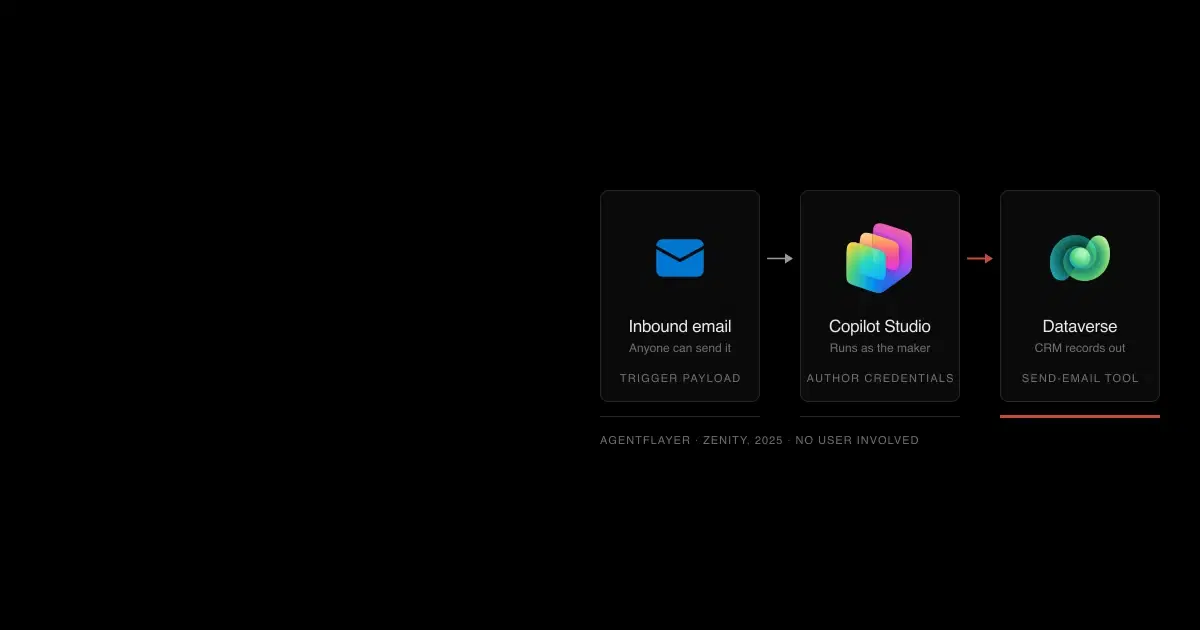
Copilot Studio. Event triggers deliver outside content as instructions and run with the author's credentials. Maker-provided credentials let every user act as the maker. Web channels without secured access are open to anyone with the agent ID, and connected agents are allowed by default within an environment. Read Copilot Studio security.
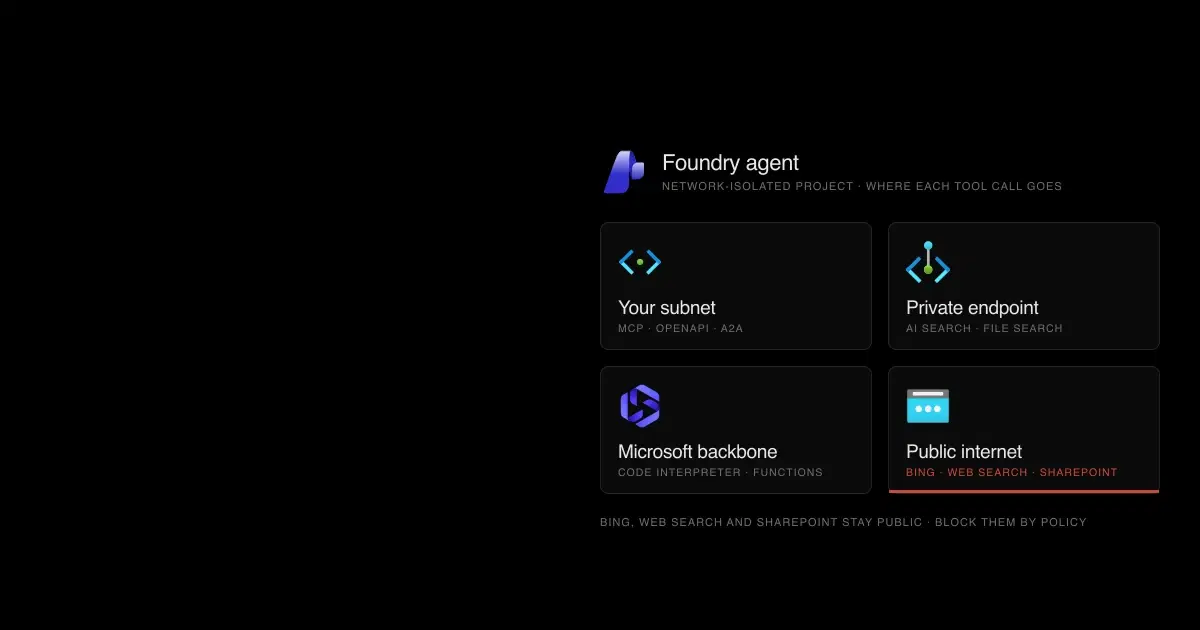
Microsoft Foundry. Agent guardrails replace model guardrails and scan tool traffic only when configured. Hosted-agent guardrails fail open on several misconfigurations. MCP's allowed_tools allows everything when empty, and Bing, web search, and SharePoint stay on public endpoints in a private network. Read Microsoft Foundry agent security.
The common thread across all three is indirect prompt injection: text from an email, document, or web page that an agent treats as instructions. Our IPI Bench research found frontier models carried out injected objectives in 4.8% to 38.5% of single attempts during long workplace tasks. The platform's classifiers reduce that rate. Limiting what an agent can do after a miss matters more.
How do Agent 365 and Entra Agent ID govern all three?#

Each platform has its own admin surface. The shared layer covers inventory and audit everywhere, but identity-based policies need an Entra agent identity, which Agent Builder agents don't have.
Agent 365 became generally available on May 1, 2026 as the control plane for agents from any of the three builders, plus some third-party platforms. Its registry and basic actions come with Microsoft 365. Policy templates, full observability, Entra Conditional Access for agents, and Defender and Purview agent protections need Agent 365 or Microsoft 365 E7.
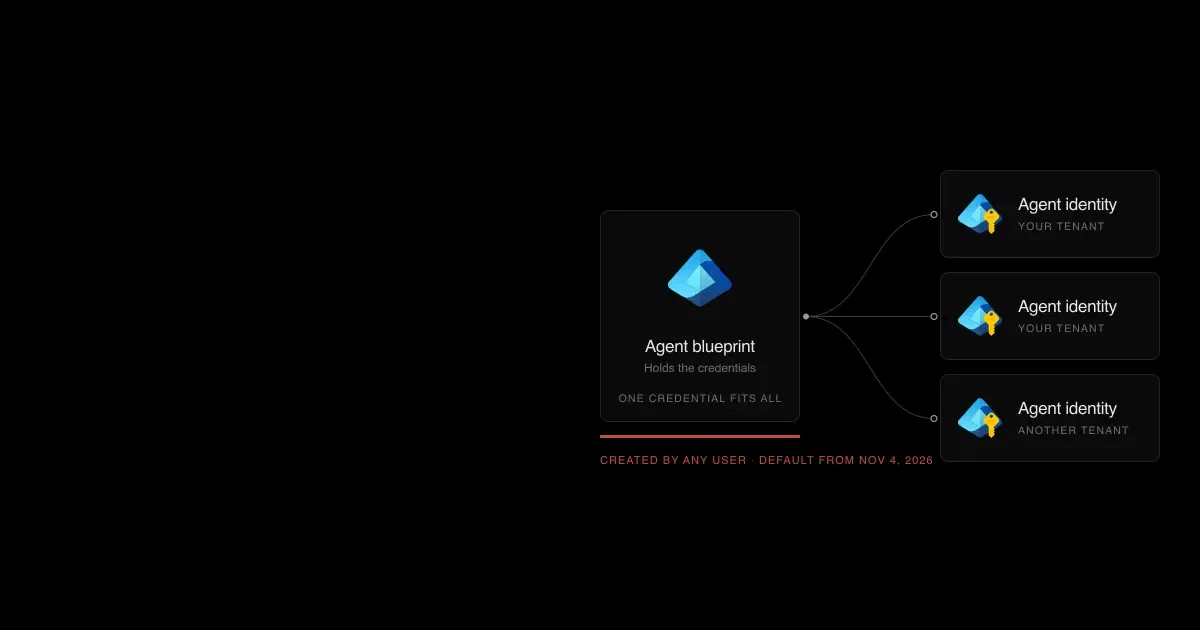
Microsoft Entra Agent ID supplies the identities. Copilot Studio and Foundry create one for each new agent; Agent Builder agents run as the user and have none. Since November 4, 2026, Entra also lets users without an admin role create their own agent identity blueprints unless an admin turns it off. Our guide to restricting agent blueprint creation covers that change.
Which should you choose? A decision checklist#
- Does the agent only answer questions from Microsoft 365 content its users can already see? Start with Agent Builder, and restrict sharing and uploaded files.
- Does it need to call a business system, run on a trigger, or appear outside Microsoft 365? Use Copilot Studio, in a governed environment with data policies set before makers start.
- Does it need custom code, private networking, specific models, or a deployment pipeline? Use Foundry, and design guardrails, identities, and networking before the first agent ships.
- Will it read content from outside the company, such as email, forms, or web pages, and also take actions? On any platform, separate the reading from the acting, require approval for sends and writes, and test it with injected content first.
- Do you need one inventory across all of them? Plan for Agent 365, and budget for its per-user license where you need its protections.
Agent Builder, Copilot Studio, and Foundry FAQ
Short answers to the questions people ask when choosing between Microsoft's agent platforms.
- Is Agent Builder the same as Copilot Studio Lite?
Yes. Microsoft has called it the Copilot Studio agent builder, Copilot Studio Lite, and now Agent Builder in Microsoft 365 Copilot. It builds declarative agents that run on Microsoft 365 Copilot. Copilot Studio is the separate, full low-code product, and you can copy an Agent Builder agent into it.
- Is Azure AI Foundry the same as Microsoft Foundry?
Yes. Azure AI Studio became Azure AI Foundry, which Microsoft now calls Microsoft Foundry. Its agent runtime, Foundry Agent Service, moved to a Responses API–based version that became generally available on March 16, 2026.
- When should I use Copilot Studio instead of Azure AI Foundry?
Use Copilot Studio when makers who don't write code need agents in Teams or Microsoft 365 that call business systems through Power Platform connectors. Use Foundry when developers need custom code, private networking, a choice of models, CI/CD, or evaluations, and can own an Azure deployment.
- Is Copilot Studio or Microsoft Foundry more secure?
Neither by default. Copilot Studio's common risks are maker credentials, open triggers, and public channels; Foundry's are guardrails that need configuration, tool approvals, identities, and network design. Foundry offers more isolation controls, and also expects you to set them up.
- Can a Copilot Studio agent call a Foundry agent?
Yes. Copilot Studio can connect Foundry agents as connected agents, in preview, and Foundry can publish agents to Microsoft 365 Copilot and Teams. Each connection adds a trust boundary: check what conversation history is passed and which identity the called agent uses.
- Is Agent 365 an agent builder?
No. Agent 365 is Microsoft's control plane for agents built anywhere, including Agent Builder, Copilot Studio, Foundry, and some third-party platforms. It provides the registry, policy templates, and Entra, Purview, and Defender protections. It became generally available on May 1, 2026.
How General Analysis helps#
General Analysis gives security teams observability across all three platforms. AI Detection and Response (AIDR) integrates with Agent Builder, Copilot Studio, and Microsoft Foundry to show what people are doing with agents and what is connected to what: which agents reach which data sources, connectors, and tools. Automated AI red teaming then tests those agents through the inputs an attacker controls and measures what injected content can make them do.