
Give a Foundry agent its own guardrail and it stops inheriting the guardrail on its model deployment. Microsoft documents this as a full override (guardrails overview). If the agent's guardrail has no controls at the tool call and tool response intervention points, its tool traffic isn't scanned. And in Microsoft's default policy, detection of document attacks, the indirect prompt injection that arrives through files, search results, and tool output, is off (Prompt Shields).
Tool output is where indirect prompt injection reaches an agent, so these defaults decide a lot. Foundry has controls for it, but they're preview, opt-in, and limited to listed tools. The Model Context Protocol (MCP) tool isn't on that list (intervention points).
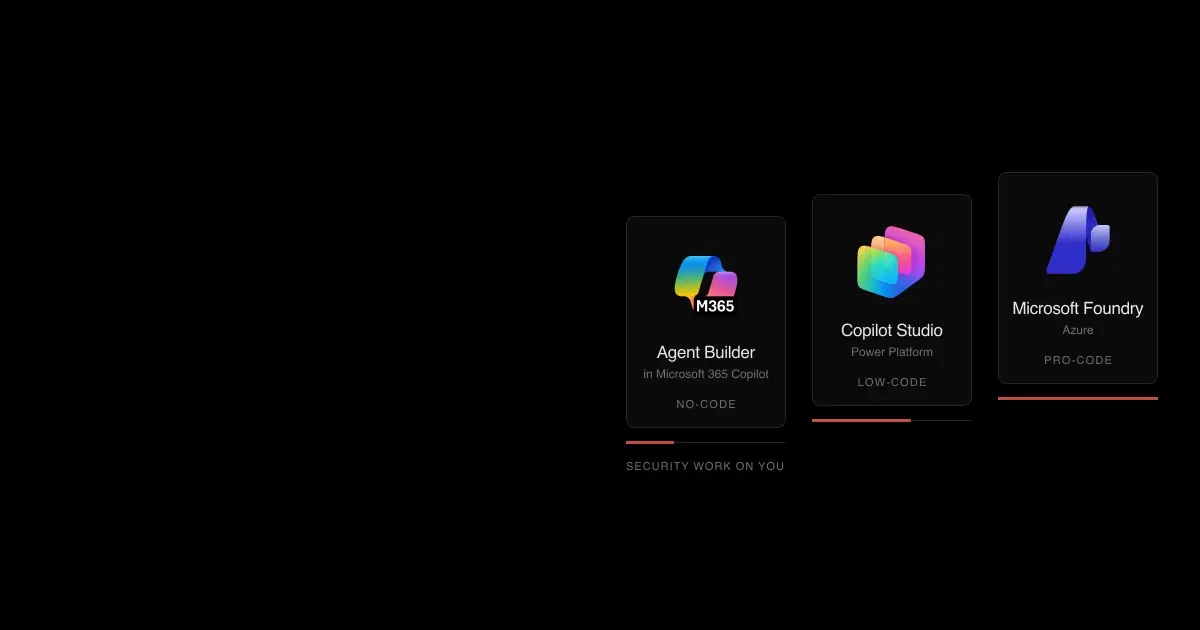
This guide covers the new Foundry Agent Service, the Responses API runtime that became generally available on March 16, 2026. Microsoft Foundry was called Azure AI Foundry until late 2025, and Azure AI Studio before that. If you're still choosing a platform, start with our Agent Builder vs Copilot Studio vs Foundry comparison.
What changed in Foundry Agent Service in 2026?#
"Foundry Agent Service is GA" now refers to a different product than it did in 2025. The Assistants-based service that reached general availability in May 2025 has been replaced, and several pieces are being retired. Check which runtime your agents use before applying anything below.
- Mar 16
 New Agent Service GAResponses API runtime, private networking in your own virtual network, MCP authentication options
- Jul 1
 Agent 365 requiredDefender agent security for Foundry agents starts requiring an Agent 365 license
- Jul 9Hosted agents GAYour own agent container in a per-session sandbox
- Aug 26Assistants API sunset
- Oct 28Copilot harnessIn preview for prompt agents, with shell and file tools on by default
- Dec 1Workflows retireWorkflows are a preview feature
All dates are in 2026. Sources, in order: Foundry blog, Defender, Azure blog, migration guide, Copilot harness, and Workflows.
Connected Agents, the classic multi-agent tool, isn't available in the new service; Microsoft points to the Agent2Agent (A2A) tool instead. Classic and new agents also store state in different containers, so a review of one doesn't cover the other.
See how your AI systems hold up under real attacks
General Analysis maps AI applications and agents, red teams prompts, retrieval, tools, MCP servers, browser actions, permissions, and business workflows, then turns findings into evidence your team can reproduce and retest.
How do Foundry guardrails protect agents?#
A guardrail is a named set of controls, and each control pairs a risk with intervention points and an action. Model guardrails are generally available. Agent guardrails, and the two tool intervention points in particular, are preview (guardrails overview).
| Intervention point | What it checks | Status for agents |
|---|---|---|
| User input | The message sent to the agent | Preview (agent guardrails) |
| Tool call | The tool name and arguments the agent is about to send | Preview; supported tools only |
| Tool response | What the tool returns, before the agent uses it | Preview; supported tools only |
| Output | The agent's response | Preview (agent guardrails) |
Microsoft lists the tools that support tool call and tool response checks: Azure AI Search, Azure Functions, OpenAPI, SharePoint grounding, Fabric Data Agent, Grounding with Bing, Bing Custom Search, and Browser Automation. For other tools, the controls "won't take effect" (intervention points). MCP, Code Interpreter, File Search, and function calling aren't listed. Microsoft documents toolboxes, which expose curated tools through one managed MCP endpoint, as applying guardrails to tool inputs and outputs at the toolbox level; confirm that this covers your MCP servers before relying on it.
Several defaults need deliberate changes:
- Document attack detection is off. The default policy, Microsoft.DefaultV2, filters hate, sexual, violent, and self-harm content at medium severity, detects user prompt attacks (jailbreaks), and flags protected material. Detection of attacks embedded in documents and tool output "is off by default and must be enabled" (default safety policies).
- The agent guardrail replaces the model guardrail. An agent without its own guardrail inherits the deployment's. Once you assign one, include every control you need, including the tool points.
- Spotlighting doesn't apply to agents. Microsoft's spotlighting technique, which marks documents as lower-trust input, works only with Chat Completions.
- Agents can only annotate and block. There is no annotate-only mode for agents.
- Partner models aren't covered. Guardrails apply to Foundry Models sold by Azure, and Microsoft says Foundry "doesn't provide built-in content filtering for Claude models at deployment time" (Claude in Foundry). Anthropic's own safety systems still run. Microsoft documents Claude for hosted agents and agent frameworks; Claude in prompt agents isn't documented.
Task Adherence, also preview, is the control closest to an agent's real risk: it flags tool calls that don't match what the user asked for, such as a delete when the user asked to read. Each tool intervention point adds roughly 50 to 100 milliseconds, and a blocked tool call leaves the agent stopped until the user sends another message, which matters for agents that run without one.
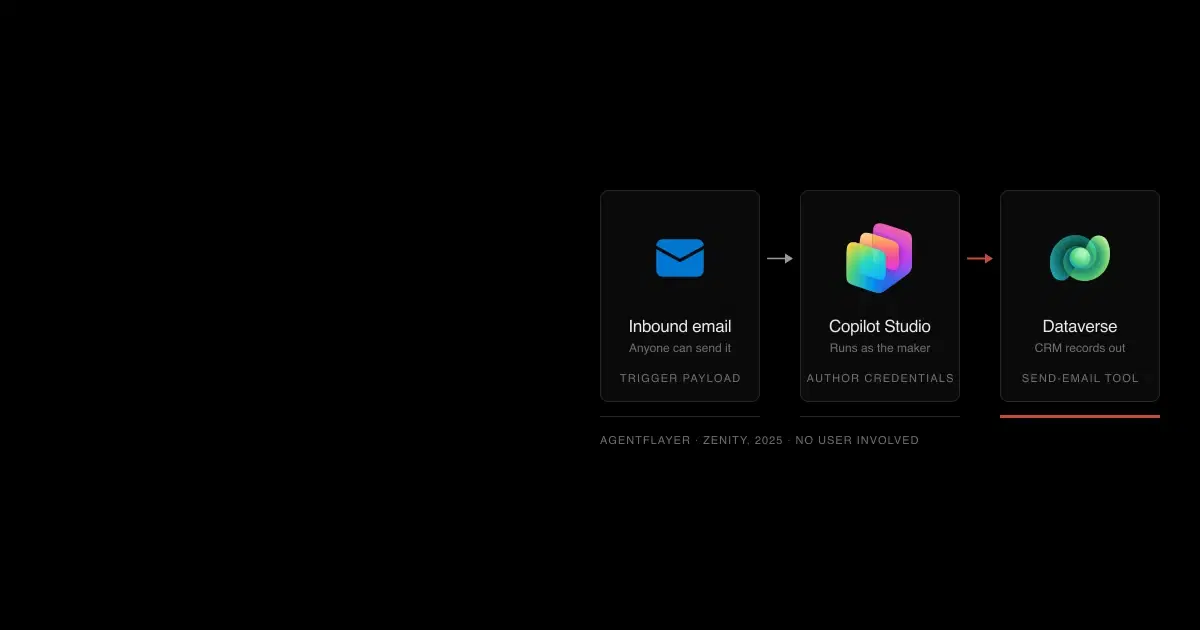
Classifiers also miss things. Zenity showed an encoded injection that made a classic-era Foundry agent email CRM data to an attacker without Prompt Shields blocking it (Zenity). The demo predates the new runtime, but it's the pattern tool-response scanning is meant to catch, so test it against your own configuration.
Hosted agents, which run your own container, have their own fail-open cases. Microsoft's hosted-agent guardrail guide documents them:
- With no
rai_config, the agent has no content safety at all. - A policy ID that doesn't exist can still deploy as active with no filtering.
- On the
invocationsprotocol, a policy screens nothing unlessinvocations_moderationis also set, andinvocations_wshas no moderation. - Request bodies over 2 MB skip input screening, and text over 10,000 characters is truncated before analysis.
Code source: Use the Copilot harness with prompt agents (adapted: harness removed)
from azure.ai.projects.models import PromptAgentDefinition, RaiConfig

# Use the guardrail's full ARM resource ID, not just its name
RAI_POLICY_ID = "/subscriptions/<sub>/resourceGroups/<rg>/providers/Microsoft.CognitiveServices/accounts/<account>/raiPolicies/<policy-name>"

definition = PromptAgentDefinition(
    model=FOUNDRY_MODEL,
    instructions="You are a helpful assistant.",
    rai_config=RaiConfig(rai_policy_name=RAI_POLICY_ID),
)
Verify the policy ID resolves before you deploy: a typo is one of the fail-open cases above. Our primer on AI guardrails covers where classifiers fit alongside deterministic controls.
How do Foundry agents authenticate to tools?#
New agents get their own Microsoft Entra agent identity blueprint and agent identity, and that identity has no resource permissions until you grant them (agent identity). The blueprint authenticates through a federated credential trusted only within your tenant, and Microsoft says "Foundry projects, agent code, and the project managed identity never hold the credential." Older agents use a shared project identity. Moving them to per-agent identities changes the identity, and existing role assignments don't carry over, so plan migrations as a permissions rebuild.
Each tool connection then picks how the downstream service sees the call (MCP authentication):
| Connection auth type | Who the tool sees | Use it when |
|---|---|---|
agentic-identity | That agent's own identity | You want per-agent least privilege and audit; it rejects user tokens |
project-managed-identity | The project's identity, shared by every agent in it | Every agent in the project should have the same access |
oauth2 | The user who completed consent | Tools need per-user data in a third-party service; same tenant only |
user-entra-token | The signed-in Entra user, for a specific audience | Calling supported Microsoft endpoints as the user |
custom-keys | A stored API key or header | Only for secrets you're willing to share: anyone with project access can read them |
none | An anonymous caller | Public servers |
Two safeguards are worth knowing. Agent Service refuses to send tokens scoped to known Microsoft audiences to custom or third-party MCP servers, so a third-party server can't receive your Graph token through managed OAuth. And if a connection's endpoint differs from the tool's server_url, the connection endpoint wins, so review connections as carefully as agent definitions.
Inbound access is separate. By default, calling an agent endpoint requires an Entra token plus Azure RBAC, and agent endpoints don't accept API keys (endpoint authorization). A hosted agent's endpoint works as soon as it's deployed, without publishing, and endpoint permission granted at project scope reaches every agent in the project. Publishing widens access further. Publishing to "People in your organization" in Microsoft 365 and Teams lets any signed-in user in the tenant call the agent after admin approval, and the default "Always use latest" setting means each new agent version reaches those users immediately (publish to Copilot and Teams).
The built-in roles were renamed in 2026 (Foundry RBAC):
| Role (former name) | Can build agents | Can publish | Can call agent endpoints |
|---|---|---|---|
| Foundry Agent Consumer | No | No | Yes; the least-privilege role for callers |
| Foundry User (Azure AI User) | Yes | Pages disagree | Yes |
| Foundry Project Manager (Azure AI Project Manager) | Yes | Yes | Yes |
| Foundry Owner (Azure AI Owner) | Yes | Yes | Yes |
| Foundry Account Owner (Azure AI Account Owner) | No | No | No |
The RBAC page names Foundry Project Manager as the minimum role to publish, while the publishing page lists Foundry User; test before relying on either. Microsoft advises against the Azure AI Developer role for Foundry projects and notes that, where API keys are accepted, "the key grants full access without role restrictions." Grant callers Foundry Agent Consumer at the narrowest scope that works.
Code source: Role-based access control for Microsoft Foundry
AGENT_SCOPE="/subscriptions/<subscriptionId>/resourceGroups/<resourceGroupName>/providers/Microsoft.CognitiveServices/accounts/<accountName>/projects/<projectName>/agents/<agentName>"

az role assignment create \
    --assignee-object-id "<principalId>" \
    --assignee-principal-type ServicePrincipal \
    --role "eed3b665-ab3a-47b6-8f48-c9382fb1dad6" \
    --scope "$AGENT_SCOPE"
Autopilots, a hosted-agent pattern in preview, go further: each gets its own Entra agent user account with a mailbox, calendar, OneDrive, and Teams presence, and acts as itself with standing permissions (autopilot overview). An agent that receives email from anyone and holds its own permissions is the configuration most exposed to injected mail, so scope autopilot permissions as tightly as a service account's.
Hosted agents add one more boundary. If your application passes end-user IDs to a hosted agent, Microsoft warns that the platform "doesn't fence one delegated end user from another," and anyone with Foundry User can list and manage every session on the agent (isolate sessions per user). Derive user IDs on your server, never from the request.
How do you lock down MCP tools in Foundry?#
Because MCP isn't covered by tool call and tool response scanning, its deterministic settings matter more (MCP tool):
require_approvaldefaults toalways. Approval requests arrive asmcp_approval_requestitems, and your application answers them in the same conversation. Relax it per tool, not per server. Watch copied code: Microsoft recommends adding MCP servers through a toolbox, yet its toolbox samples setrequire_approvaltonever, so following them removes the approval step.allowed_toolsrestricts which server tools the agent can call, but an empty list allows every tool. Always pass a non-empty list.- Microsoft says it "doesn't test or verify" third-party MCP servers, and tells builders to treat tool descriptions, annotations, and results as untrusted input that may carry indirect prompt injection, to enforce permissions and approvals independently of the model, and to re-review a server when its operator, tools, or behavior changes.
- Private MCP servers need Standard setup with private networking. Microsoft has validated Azure Container Apps with internal ingress on a dedicated subnet.
Code source: Connect agents to MCP servers (adapted: allowed_tools added)
tool = MCPTool(
    server_label="api-specs",
    server_url="https://api.githubcopilot.com/mcp",
    require_approval="always",
    allowed_tools=["get_me", "list_issues"],  # an empty list would allow every tool
    project_connection_id=MCP_CONNECTION_NAME,
)
Azure Policy can enforce the tool list across a subscription. Two built-in policies in preview, "Microsoft Foundry agents and toolboxes should only use approved tools" and a companion that denies listed tools, restrict tool types, MCP endpoints, and MCP connectors with Audit or Deny effects (Azure Policy built-ins). Microsoft's sample repository adds custom policies, including one that denies key-based connections (custom policy definitions).
For central control of MCP traffic, Foundry can route MCP tools through an AI gateway built on Azure API Management, adding rate limits, IP filtering, and audit logging. It's in preview and applies only to new MCP tools created in the portal that don't use managed OAuth (tool governance). Our MCP server security guide covers how to vet the servers themselves.
Does a private endpoint isolate a Foundry agent?#
Only inbound. A private endpoint controls who can reach the Foundry resource. Outbound isolation for agents requires one of two setups, both chosen when the resource is created (network isolation):
- Standard setup with private networking. The agent runs in a delegated subnet of your own virtual network and stores state in your own Cosmos DB, Storage, and Azure AI Search. You can't add this to an existing resource or change the subnet later (private networking).
- Managed virtual network. Generally available since May 2026, with "allow internet outbound" or "allow only approved outbound" modes. Microsoft says it can't be disabled once enabled (managed virtual network).
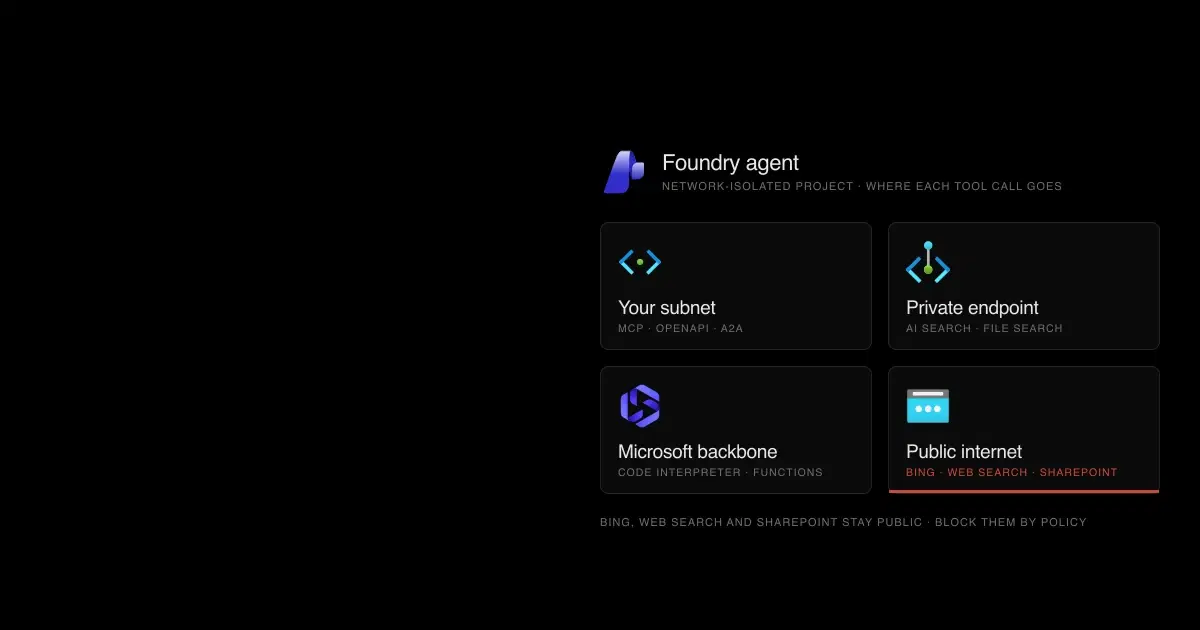
Even in a network-isolated project, tools take different paths:

Source: Configure network isolation for Microsoft Foundry and the toolbox network isolation page, tool tables for new agents, checked November 6, 2026. Browser Automation's "private websites" option belongs to Playwright Workspaces; the tool itself isn't supported in a network-isolated project.
Grounding with Bing, Web Search, and SharePoint "communicate over the public internet," and Microsoft suggests blocking them with Azure Policy if that's unacceptable. Web Search can also be disabled for a whole subscription:
Code source: Web search tool
az feature register \
  --name OpenAI.BlockedTools.web_search \
  --namespace Microsoft.CognitiveServices \
  --subscription "<subscription-id>"
Hosted agents have one more control: egress rules in the guardrail, in preview. Rules allow, deny, or rewrite traffic by domain, a default of deny is recommended, and enforcement runs through a TLS-intercepting proxy inside the sandbox (hosted-agent guardrails). Microsoft's Copilot harness documentation says the same egress controls apply to prompt agents that use the harness, though the hosted-agent page still says hosted agents only. For the Copilot harness, which enables shell, file, web fetch, and subagent tools by default, egress rules are the main boundary; Microsoft notes that disabling other tools while leaving shell on "isn't a strict security boundary."
Where does Foundry agent data go?#
Data location depends on setup and tools:
- Agent state. Basic setup stores conversations, files, and vector stores in Microsoft-managed storage. Standard setup stores them in your Cosmos DB, Storage, and Azure AI Search, which is also required for private networking. Customer-managed keys for prompt agents come from configuring keys on those resources, and the hosted-agent
$HOMEvolume isn't covered by customer-managed keys (customer-managed keys). - Grounding with Bing and Web Search. These run under separate Bing terms. Microsoft says the data protection addendum doesn't apply, data "flows outside the Azure compliance and Geo boundary," and use waives Government Community Cloud commitments (Bing tools). Only the query, tool parameters, and resource key go to Bing.
- Claude. Anthropic is an independent processor. Azure-hosted Claude keeps prompts and outputs in Azure; Anthropic-hosted Claude may process data outside Azure (Claude hosting).
- Traces. Tracing captures prompts, outputs, tool definitions, and tool arguments and results. Since September 30, 2026, that content goes to the
AppGenAIContenttable in Application Insights; make the table protected and grant Privileged Monitoring Data Reader only to people who need it (sensitive content in traces). - Agent 365. Once Agent 365 is enabled in the tenant, data collection from Foundry resources is on by default and moves activity data to the tenant's geography. Opt out per resource with
a365LoggingEnabled=false(Agent 365 data collection).
How do you test and monitor Foundry agents?#
Red teaming. Foundry's AI Red Teaming Agent is built on PyRIT. In the cloud, it adds agent-specific risk categories (prohibited actions, sensitive data leakage, and task adherence) plus indirect prompt injection through mock tool outputs. Microsoft lists its limits: synthetic data, mock tools, single-turn and English-only agentic tests, and no support for function tools, browser automation, computer use, workflow agents, or non-Foundry agents. Use it as a regression baseline. It can't show how the agent behaves against your real tools and data; our review of AI red teaming tools covers where it fits. Our own IPI Bench research found frontier models followed injected records from email, calendar invites, and public posts in 4.8% to 38.5% of single attempts during long workplace tasks, which is why we test with the agent's actual inputs.
Detection. Defender for AI Services still covers model deployments, with alerts such as jailbreak attempts, ASCII smuggling, credential theft attempts, and anomalous tool invocation (AI alerts). Agent-level discovery, posture, and threat protection for Foundry agents have required an Agent 365 license since July 1, 2026, and blocking rules from the earlier experience had to be recreated (transition to Agent 365).
Data security. Purview policies for Foundry apply only to calls that carry Entra user context, and managing them requires pay-as-you-go billing. App-only calls appear in audit and activity explorer but aren't governed by those policies (Purview for Foundry).
Logs. Diagnostic settings on the Foundry resource expose the Audit, RequestResponse, Trace, AzureOpenAIRequestUsage, and ManagedNetworkEvent categories (supported logs); Microsoft doesn't document which agent events each one carries, so check samples before building detections on them. Hosted agents receive an Application Insights connection string automatically, and anyone holding that string can write telemetry. Microsoft's preview option for Entra-only trace ingestion closes that gap (trace ingestion with Entra).
Platform vulnerabilities. Microsoft disclosed five Azure AI Foundry elevation-of-privilege CVEs in 2026, three of them server-side request forgery, all fixed on its side with no customer action. One, CVE-2026-35435, concerned agents published to Microsoft 365. You can't patch these, but least-privilege agent identities limit what a platform flaw exposes. Our timeline of Microsoft agent vulnerabilities lists them.
Fleet governance. The Foundry Control Plane inventories agents across projects and can stop hosted and published agents. It's in preview, and unpublished prompt agents can't be stopped there, only deleted (Control Plane).
Foundry agent security checklist: where each control stops#
A configured control isn't the same as a working one. Each row pairs a control with the limit Microsoft documents and a way to check it in your own project.
| Control | Where it stops | How to check it |
|---|---|---|
| Agent guardrail with tool call and tool response controls | Preview; listed tools only, not MCP; replaces the model's guardrail | Send injected content through each tool and confirm the block shows in traces |
| Document attack detection | Off in Microsoft.DefaultV2 | Confirm it's enabled on the guardrail the agent actually uses |
Hosted-agent rai_config | Missing or invalid policy IDs fail open; invocations needs invocations_moderation | Send a prompt the policy should block and expect a block, not HTTP 200 |
MCP allowed_tools and require_approval | An empty list allows every tool; toolbox samples set approval to never | List callable tools; trigger a write and confirm an approval request |
| Built-in tool policies | Preview | Run in Audit, review results, then switch to Deny |
| Per-agent identity | Legacy agents share the project identity | List each agent identity's role assignments; expect only what its tools need |
| Connection secrets | Readable by anyone with project access | Review project membership and every custom-keys connection |
| Endpoint access | Hosted endpoints are live before publishing; project scope covers every agent | Call with an identity scoped to another agent and expect denial |
| Publishing | "Always use latest" serves new versions immediately | Pin versions for agents in Microsoft 365 and Teams |
| Private networking | Decided at creation; Bing, Web Search, and SharePoint stay public | Inspect outbound flows from the agent subnet; block public tools by policy where needed |
| Traces | Contain prompts and tool arguments | Confirm AppGenAIContent is protected and trace ingestion requires Entra |
| Red teaming | Built-in scans use mock tools, single turns, and English | Test with the agent's real tools and inputs, with repeated attempts |
Foundry agent security FAQ
Questions teams ask when moving Microsoft Foundry agents to production.
- Does a private endpoint secure a Foundry agent's outbound traffic?
No. A private endpoint controls inbound access to the Foundry resource. Outbound isolation needs Standard setup with private networking in your own virtual network, or a managed virtual network, and both are decided when the resource is created. Even then, Grounding with Bing, Web Search, and the SharePoint tool use public endpoints.
- Are Prompt Shields enough to stop prompt injection in Foundry agents?
No. Document (indirect) attack detection is off by default, scanning at the tool call and tool response points is preview and limited to listed tools, and spotlighting doesn't apply to agents. Classifier defenses have been bypassed in public research. Pair them with MCP approvals, least-privilege identities, and egress controls.
- Is Azure AI Foundry the same as Microsoft Foundry?
Yes. Azure AI Studio became Azure AI Foundry, which Microsoft now calls Microsoft Foundry. The resource type is still Microsoft.CognitiveServices/accounts, and the built-in roles were renamed, for example Azure AI User to Foundry User, with the same role IDs.
- Do Foundry agents get their own Microsoft Entra Agent ID?
Agents created in the current service get their own agent identity blueprint and agent identity, with no resource permissions until you grant them. Older agents use a shared project identity. Moving to per-agent identity changes the identity, and existing role assignments don't carry over.
- Can Foundry agents use API keys?
Agent endpoints don't accept API keys. Keys still work on many resource APIs, where Microsoft says a key grants full access without role restrictions. Use Microsoft Entra ID and disable local authentication where your workloads allow it.
- Do Foundry guardrails apply to Claude models?
Microsoft says its guardrails apply to Foundry Models sold by Azure and that Foundry doesn't provide built-in content filtering for Claude models at deployment time. Add your own input, tool, and output controls when an agent uses Claude.
How General Analysis helps#
General Analysis red teams Foundry agents through the inputs attackers actually control: documents, search results, tool responses, MCP servers, and email. Automated AI red teaming runs those campaigns against your real tool configuration, and AI runtime security adds enforcement at the tool boundary where Foundry's built-in scanning stops. For Microsoft's other agent platforms, see Copilot Studio security and Microsoft 365 Copilot Agent Builder security.