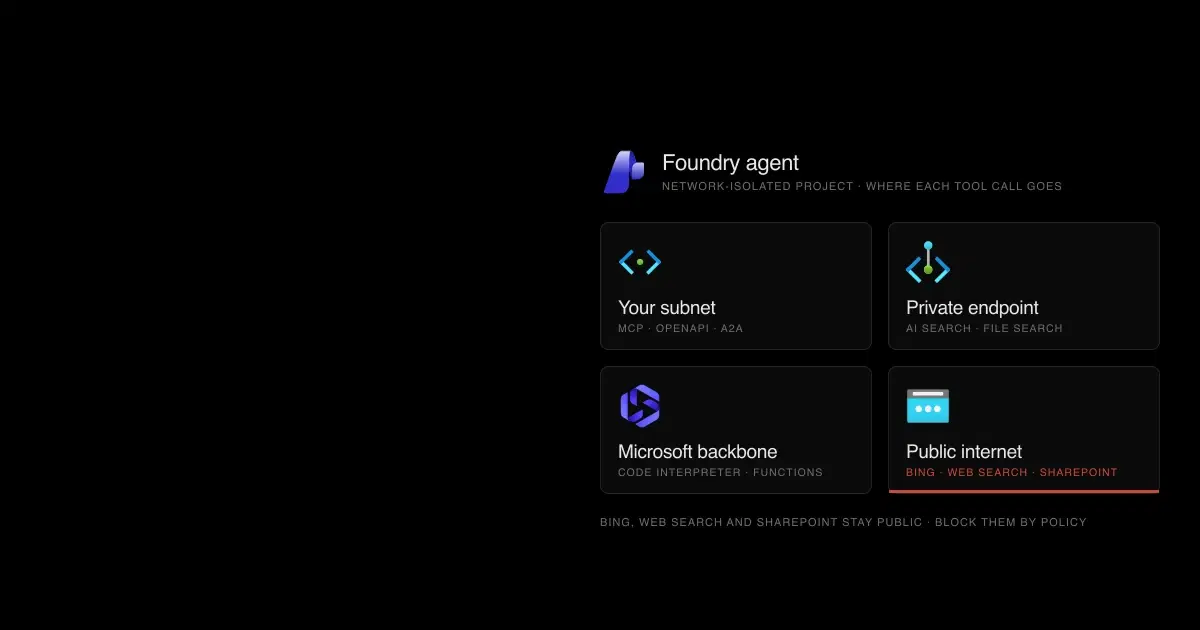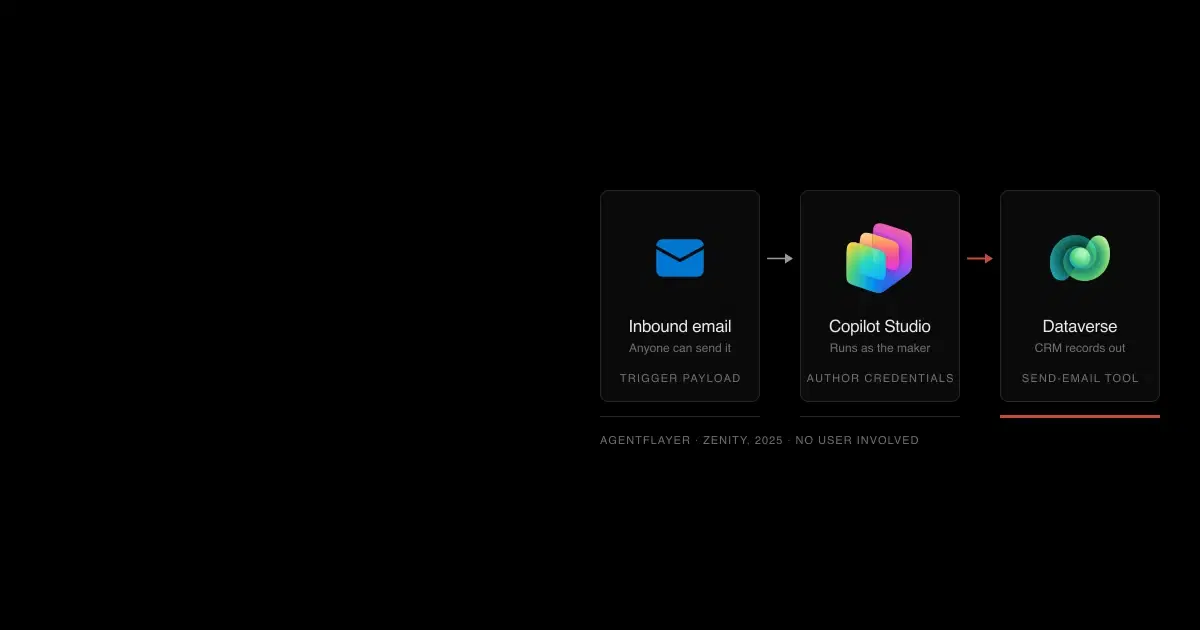

Microsoft describes Copilot Studio's event triggers plainly. A trigger's payload is "sent to your agent as a message," and the agent can act on instructions in it (about triggers). Event triggers can also only authenticate with the agent author's credentials, and Microsoft's publish warning says that "might allow users of an agent without their own authorization the ability to access data and systems they shouldn't" (event triggers). Attach that trigger to a mailbox and anyone who can send it email is writing instructions that run with the maker's access.
Zenity demonstrated exactly this in 2025: injected emails made a Copilot Studio customer-service agent reveal its tools, email its knowledge file, and send CRM records to the attacker, with no user involved (AgentFlayer). Microsoft fixed that report, but the configuration that enabled it is still available to any maker.

Every step after the inbox runs with access the sender never had. The control under each step is covered in the sections that follow.
Copilot Studio's core defaults are sensible. The published attacks used features makers added or changed, plus two defaults Microsoft leaves open: agent-to-agent connections within an environment and web channels without secured access. This guide maps those settings to the controls that address them. For the full record of incidents, see our timeline of Copilot Studio vulnerabilities; for platform choice, see Agent Builder vs Copilot Studio vs Foundry.
Copilot Studio is part of Power Platform, Microsoft's low-code family that also includes Power Apps for internal business apps and Power Automate for workflows. Agents live in Power Platform environments, which hold an organization's apps, flows, agents, and business data, each with its own roles and policies (environments). That business data usually sits in Dataverse, the database underneath Power Platform and Dynamics 365, Microsoft's CRM and ERP suite (what is Dataverse). Copilot Studio stores its conversation transcripts there too.
Is Copilot Studio secure? What Microsoft secures and what makers configure#
Microsoft patches the platform and ships secure defaults. Copilot Studio's security scan states "By default, agents are secure" and warns before publishing when a maker turns off authentication, switches a tool to maker-provided credentials, or shares the agent with everyone. It warns; it doesn't block.
| Microsoft owns | Makers and admins own |
|---|---|
| Platform vulnerabilities, such as the 2024 SSRF and the ShareLeak fix | Authentication mode and web channel access |
| Prompt injection classifiers on published agents | Which credentials each tool uses |
| Secure defaults for new agents | Triggers, and who can reach them |
| Data policy enforcement once admins configure it | Knowledge sources, tools, MCP servers, and connected agents |
| Entra agent identities for new agents | Sharing, environments, and monitoring |
Microsoft's side isn't flawless either. Besides the CVEs in our timeline, BeyondTrust presented an escape from Copilot Studio's code interpreter sandbox at DEF CON 34 in August 2026, reaching keys and environment variables inside the container (DEF CON abstract). Customers can't patch that kind of flaw; they can limit what an agent's tools and identities expose when one occurs.
Copilot Studio now runs agents on more than one "harness." The standard harness runs topic-based and generative agents. The Microsoft Copilot harness, which reached general availability in August 2026 as the GitHub Copilot harness and was renamed on October 28, runs reasoning-heavy agents with skills, memory, and files, each task in a sandbox. Microsoft says "there's no setting that turns the GitHub Copilot harness on or off"; it's governed through the same Dataverse roles, data policies, and sharing controls (harness FAQ). Check which harness an agent uses before applying the controls below, because some settings and channels differ.
See how your AI systems hold up under real attacks
General Analysis maps AI applications and agents, red teams prompts, retrieval, tools, MCP servers, browser actions, permissions, and business workflows, then turns findings into evidence your team can reproduce and retest.
Copilot Studio security risks: a threat model#
| Risk | How it happens | Public example | Main control |
|---|---|---|---|
| Anyone can chat with the agent | "No authentication," or web channels without secured access | Zenity found thousands of explorable public agents | Data policy blocking unauthenticated chat; web channel security |
| Injected instructions from triggers | Email, SharePoint, and other trigger payloads arrive as messages | AgentFlayer; ShareLeak (CVE-2026-21520) | Trigger scope, data policies on triggers, approvals |
| Everyone acts as the maker | Maker-provided credentials on tools, triggers, or computer use | Zenity's 2024 "Copilot author authentication" finding | Maker credential controls; safe sharing enforced |
| Data leaves through tools | Send-email, HTTP, and update tools do what the injected text asks | AgentFlayer, ShareLeak, Tenable's $0 trip | Recipient limits, HTTP endpoint filtering, field-level write scopes |
| Data leaves through rendering | Markdown images and links carry data in URLs | Microsoft names the risk in its image and URL controls | "Showing images and URLs" set to block untrusted |
| One agent drives another | Connected agents are allowed by default within an environment | Zenity's connected agents research | Turn off agent connections on sensitive agents |
| Consent phishing on a Microsoft domain | Manual authentication forwards the user's token from the demo website | Datadog's CoPhish | User consent policy; restrict app registration |
| Third-party tools | MCP servers and connectors return untrusted content | Microsoft's own MCP responsibility notice | Advanced connector policies; vetted servers |
Examples are described in our vulnerability timeline.
Does Copilot Studio protect against prompt injection?#
Partly, and by default. Copilot Studio has built-in protection against user prompt injection attacks (UPIA, a user trying to override instructions) and cross-domain prompt injection attacks (XPIA, instructions hidden in content the agent reads) (external threat detection). Microsoft says "all published agents automatically have threat detection enabled," and the Agents page shows each agent's protection status as Protected, Needs review, or Unknown; selecting it opens a summary with the number of blocked messages (runtime protection status).
The classifiers don't settle the question. Capsule Security's ShareLeak report found that during testing, "even when Microsoft's safety mechanisms flagged the request, data was still exfiltrated" (Capsule). Zenity believes the AgentFlayer fix mainly blocks known payloads. Our own IPI Bench research found frontier models carried out injected objectives from email and calendar records in 4.8% to 38.5% of single attempts, and far more often when attackers retried. Plan for the classifier to miss sometimes, and make sure a miss can't do much.
Four deterministic settings limit what a successful injection can achieve:
- Tool confirmation and inputs. When a maker adds a tool, it's on by default, the agent decides when to call it, the model fills its inputs from the conversation, and "Ask the end user before running" is set to No (add tools). Injected text is part of that conversation. For tools that send, write, or delete, turn confirmation on and pin sensitive inputs, such as recipient addresses, with a custom value.
- Images and URLs. Microsoft warns that "malicious actors can exploit rendered images and embedded URLs in Copilot Studio to exfiltrate sensitive data." Under Power Platform admin center > Security > Threat detection > Showing images and URLs, choose "Block untrusted images and other URLs" or "Block all images and other URLs" per environment or environment group (image and URL controls).
- Trigger payloads. Narrow triggers with parameters, such as specific senders or folders. Microsoft warns that "trigger payloads can potentially contain sensitive information that an agent can output in other locations through actions."
- Ungrounded answers. Turning off "Allow ungrounded responses" stops answers that don't come from a knowledge source or tool. Microsoft notes it doesn't guarantee the model won't use general knowledge.
The check also covers content from knowledge sources and tool outputs, so legitimate pages sometimes trip it, and makers see "The content was filtered due to Responsible AI restrictions" (error codes). Microsoft's documented fixes are to rephrase the request, review those sources, or adjust the content moderation level; it documents no setting that turns off the jailbreak or indirect-attack checks.
Authentication: who can chat with your agent?#
New agents default to Authenticate with Microsoft, which signs users in through Entra ID in Teams, SharePoint, Power Apps, and Microsoft Copilot (user authentication). The other options carry specific risks:
- No authentication. Microsoft's caution: it "allows anyone who has the link to chat and interact with your bot or agent." Agents in this mode can't use tools with user credentials, so they tend to accumulate maker credentials instead.
- Authenticate manually. Supports Entra ID with federated credentials, certificates, or client secrets, and generic OAuth 2.0. It exposes the user's token to topics as
User.AccessToken, the variable Datadog's CoPhish forwarded to an attacker (Datadog). With generic OAuth, sharing controls can't restrict which people in your organization chat with the agent.
Web channels need their own setting. "Without secured access, anyone who knows the agent ID can connect through the Demo website and Custom website channels," Microsoft says. Turn on Settings > Security > Web channel security > Require secured access, keep the Direct Line secret on a server, and give browsers short-lived tokens; the change can take up to two hours to apply (web channel security). Microsoft also says the demo website "isn't intended for production use."
Code source: Configure web channel security
POST https://directline.botframework.com/v3/directline/tokens/generate
Authorization: Bearer <DirectLineSecret>
Run that call from your server and pass only the resulting token to the browser. It works for one conversation and expires after its expires_in period, 1,800 seconds in Microsoft's sample, unless your server refreshes it.
Maker-provided or end-user credentials?#
Connector tools use end-user credentials by default (connectors). A maker can switch any tool to maker-provided credentials, after which everyone who chats with the agent acts with the maker's access. Three places default to or require the maker's identity:
- Event triggers authenticate only with the author's credentials.
- Computer use defaults to maker-provided credentials, with Microsoft's warning that "anyone using it can act with the original author's access on the configured machine" (computer use).
- Agents without authentication can't use end-user credentials at all.
Admins have two environment-level controls in the Power Platform admin center:
| Setting | Path | Effect |
|---|---|---|
| Control maker credential options | Environment > Settings > Product > Features > Copilot Studio agents | Allow end-user credentials only, maker-provided only, or both (the default). Restricting to end-user credentials applies within about a minute and breaks autonomous and scheduled agents, which need stored credentials (maker credential control) |
| Sharing agents with embedded maker credentials (preview) | Environment > Settings > Features | "Safe sharing enforced" blocks new sharing and publishing for agents whose nonshareable connections use design-time maker credentials; "All sharing allowed" only informs. It doesn't unshare existing agents (embedded maker credentials) |
Separate environments are the practical answer: keep autonomous agents that need stored credentials in an environment with tight sharing and monitoring, and enforce end-user credentials everywhere else.
Copilot Studio DLP: what to block in data policies#
Power Platform data policies govern Copilot Studio through "virtual connectors," and Microsoft has enforced them for all tenants since early 2025 (data policies for agents). Connectors sit in Business, Non-business, or Blocked groups, and an agent can't combine Business and Non-business connectors.
| Data policy connector | What blocking it does | Suggested baseline |
|---|---|---|
 Chat without Microsoft Entra ID authentication in Copilot Studio | Forces user authentication | Block, except in a dedicated public-agent environment |
| Direct Line channels in Copilot Studio | Disables demo website, custom website, and mobile channels; allowed by default | Block where agents are internal-only |
| Facebook channel, WhatsApp channel, and Omnichannel in Copilot Studio | Disables those channels | Block unless used |
 HTTP | Blocks HTTP request nodes; or filter allowed endpoints | Endpoint filtering to known hosts |
| Microsoft Copilot Studio | Blocks event triggers (and automated evaluations that use authenticated accounts) | Block outside environments approved for autonomous agents |
| Skills with Copilot Studio | Blocks Azure Bot Service skills | Block unless used |
| Individual Power Platform connectors | Blocks them as tools, including MCP servers that rely on them | Classify by data sensitivity |
Two caveats. Endpoint filtering, in preview, also covers SharePoint and public websites configured as knowledge, through each connector's Configure connector > Connector endpoints option, but it checks only static endpoints, not URLs built from variables or at runtime. And enforcement isn't instant: Microsoft says full enforcement takes up to 24 hours in extreme cases, usually within an hour (data policies overview).
Microsoft is moving some controls out of data policies. The Power Platform admin center has newer Authentication for agents and Agent access channels settings, both in preview, which Microsoft describes as a modernized framework for the same virtual connectors, with the most restrictive setting winning (identity and access management). Advanced connector policies add a default-deny allow list and can block an entire MCP server, but not individual MCP tools, and don't yet cover custom or HTTP connectors (advanced connector policies). In Copilot Studio they're enforced only at runtime until their design-time rollout reaches it.
Runtime protection: external threat detection and Defender#
External threat detection, in preview, sends each planned tool call to a security service before it runs. The service answers allow or block, and a block stops the agent and tells the user (external threat detection). The provider can be your own service, Microsoft Defender, or a third party. Four details shape how much you can rely on it:
- It runs only for agents using generative orchestration. Classic agents skip it.
- "If the agent doesn't receive a decision from the system (either allow or block) within one second, by default, it proceeds to allow the tool to execute as planned." The error behavior setting, which covers both timeouts and errors, defaults to "Allow the agent to respond." Change it to "Block the query" for environments whose agents can't tolerate a missed check; the setting applies per environment, not per agent.
- It's configured per environment under Security > Threat detection > Additional threat detection, with no tenant-wide setting, so each new environment has no external threat detection until an admin sets it up. The built-in classifiers still apply.
- The provider receives the recent prompt and chat history, outputs of previous tools, conversation metadata, and the proposed tool inputs, possibly outside your geography.
Code source: External threat detection interface for developers
POST /analyze-tool-execution?api-version=2025-05-01
Authorization: Bearer <token>
x-ms-correlation-id: <correlation-id>
The response's required blockAction boolean decides the call; reasonCode, reason, and diagnostics are optional. A provider that's slow under load fails open, so measure its latency at peak traffic.
Microsoft Defender's real-time protection for Copilot Studio is in preview, evaluates tool invocations, and since July 1, 2026 requires an Agent 365 license. Its default rule only audits; blocking needs a custom rule under Defender Settings > Security for AI > Policies & rules (Defender real-time protection).
Connected agents, MCP servers, and computer use#
Connected agents. "By default, any agent can connect to another agent in the same environment," and "Pass conversation history to this agent" is on by default (connected agents). Turn off Let other agents connect to and use this one on agents with sensitive knowledge or tools. Admins can also disable connected agents per environment, in preview, under Power Platform admin center > Copilot > Settings > Connected Agents Copilot Studio; existing connections stay visible but can't be invoked (channel and connected agent controls).
MCP servers. Copilot Studio supports MCP tools and resources over streamable HTTP; SSE support ended in August 2025. MCP access runs through Power Platform connectors, so "if a data policy regulates Power Platform connectors, it also regulates access to the MCP server and its tools" (add an MCP server). Microsoft puts responsibility for external servers on you, and tools on a server change dynamically, so re-review servers when they change. Our MCP server security guide covers vetting them.
Computer use. By default, "computer use can operate on any website or application." The allow list stops actions on unlisted sites but "doesn't stop the model from opening them." Run logs, including screenshots of the machine, are stored in Dataverse by default (monitor computer use). Use dedicated machines, a least-privilege account, end-user credentials where possible, and human supervision for sensitive steps, or turn computer use off in environments that don't need it (administer computer use).
Environments, sharing, and agent identity#
Copilot Studio creates a default environment for new makers. Microsoft recommends a non-default production environment for agents you deploy (environments). Managed Environments add sharing limits, such as individuals only or a cap on viewers, enforced when an agent is shared. Microsoft notes "sharing limits only apply to agents that require authentication" (sharing controls).
You can't switch off agent creation. Microsoft's security FAQ says so directly and recommends data policies to stop people chatting with unapproved agents. Limit authoring with the Copilot Studio authors security group in tenant settings, and block self-service trial signups.
New agents get a Microsoft Entra agent identity automatically, with no opt-out. Two limits matter. Custom connectors, MCP servers, and REST API tools don't add API permissions to the identity. And "scope enforcement at runtime, including Microsoft Entra Conditional Access on the agent identity, currently applies only when the agent runs in Microsoft Teams" (agent identities). Our guide to restricting Entra agent blueprint creation covers the identity layer.
The agent inventory in the Power Platform admin center, Power Platform API, and Azure Resource Graph lists Copilot Studio and Agent Builder agents with fields that answer security questions directly, including authentication type, channels, whether the agent is shared with the entire tenant, and whether each connector runs as the maker or the user. Those fields are in preview, reflect only published versions, and exclude classic chatbots. Agents that fail review can be quarantined through the Power Platform API; they stay visible and testable but stop answering in every channel.
Code source: Quarantine agents with the Power Platform API
POST https://api.powerplatform.com/copilotstudio/environments/{EnvironmentId}/bots/{BotId}/api/botQuarantine/SetAsQuarantined?api-version=1
Audit and monitoring#
- Purview Audit captures agent interactions and maker activity, and Purview DLP can stop agents published to Teams, SharePoint, and Microsoft 365 Copilot from processing labeled SharePoint content. Agents published to non-Microsoft channels need Purview pay-as-you-go billing (Purview for Copilot Studio). Test the trail rather than trusting it: Datadog found admin events for publishing, sharing, and authentication changes missing from the log in 2025, saw some recur after Microsoft's fix, and noted that unauthenticated chats produce no
CopilotInteractionevent (Datadog). - Transcripts are stored in Dataverse. The environment setting that lets owners and editors see transcripts is on by default, but viewing also requires the Bot Transcript Viewer role, which only admins have by default. Holders can read transcripts for every agent they create or that's shared with them in the environment (transcript controls). Grant the role sparingly where transcripts may contain sensitive data.
- Defender hunting and detections for agents need Agent 365 and are in public preview. Our guide to Defender's agent discovery explains the gap between inventory and protection.
- Customer-managed keys cover agent definitions, telemetry, and conversations in Managed Environments, but not the data Copilot Studio sends out for Agent 365 security audit logging (customer-managed keys).
Copilot Studio security checklist#
| Area | Default | Production setting |
|---|---|---|
| Agent authentication | Authenticate with Microsoft | Keep it; block "Chat without Microsoft Entra ID authentication" in data policies |
| Web channels | Direct Line allowed; secured access off | Require secured access; block Direct Line where unused |
| Tool credentials | End-user, with maker credentials allowed | End-user only where possible; safe sharing enforced (preview) |
| Event triggers | Author credentials; any configured source | Named senders and folders; triggers allowed only in approved environments |
| Tool confirmation | "Ask the end user before running" set to No; inputs filled by the model | Confirmation on for tools that send, write, or delete; recipients pinned with custom values |
| Outbound tools | As configured | Recipient allow lists, HTTP endpoint filtering, approval for external sends |
| Images and URLs | Not stated by Microsoft | Block untrusted images and URLs |
| Connected agents | Any agent in the environment can connect | Off for sensitive agents; disabled where unused |
| MCP servers | Any server a maker adds | Advanced connector policies; reviewed servers only |
| Runtime protection | Built-in UPIA and XPIA classifiers | External threat detection per environment, error behavior set to "Block the query" where appropriate, provider latency measured |
| Environments | Default environment for new makers | Production environments with Managed Environment sharing limits |
| Transcripts | Owner and editor viewing on; Bot Transcript Viewer role required | Grant the viewer role sparingly; stop saving transcripts where conversations are sensitive |
| Review | None | Monthly inventory export: unauthenticated, tenant-wide shared, maker-credential agents |
Copilot Studio security FAQ
Answers to common questions about securing Microsoft Copilot Studio agents.
- Is Copilot Studio secure by default?
Its defaults are sensible: new agents use Authenticate with Microsoft, connector tools use end-user credentials, agents start unshared, and published agents get prompt injection classifiers. A security scan warns before publishing if a maker changes these. The risk comes from what makers add, such as email triggers, maker credentials, public channels, and tools that can send data out, and from two defaults left open: connected agents within an environment and web channels without secured access.
- Does Copilot Studio protect against prompt injection?
It has built-in protection against user prompt injection (UPIA) and cross-domain prompt injection (XPIA) on all published agents and blocks what it detects. Public research still got through: Zenity's AgentFlayer and Capsule Security's ShareLeak both exfiltrated data, and ShareLeak was flagged without being stopped. Treat the classifiers as one layer and limit what an injected instruction could do.
- What does "The content was filtered due to Responsible AI restrictions" mean in Copilot Studio?
Microsoft documents it as the ContentFiltered error: a Responsible AI check blocked the user's input or the agent's response, which can include content from knowledge sources and tool outputs. When Copilot Studio can name the category, it returns a code such as OpenAIndirectAttack or OpenAIJailBreak instead. Microsoft's documented fixes are to rephrase the request, review those sources, or adjust the agent's content moderation level; it documents no setting that turns off the jailbreak or indirect-attack checks.
- Can I stop people creating Copilot Studio agents?
Microsoft's security FAQ says you can't disable agent creation, and recommends data policies to stop anyone chatting with unapproved agents. To restrict authoring, use non-default environments with environment security groups, grant Environment Maker only to approved makers, and block self-service trial signups. The Copilot Studio authors tenant setting only grants author access in pay-as-you-go scenarios; it doesn't revoke licenses or roles.
- Should agent tools use maker-provided or end-user credentials?
End-user credentials, wherever the channel supports them. Maker-provided credentials let everyone who chats with the agent act with the maker's access. Admins can restrict the option per environment, and a preview setting can block new sharing and publishing of agents that embed maker credentials. Event triggers are the exception: they only work with the author's credentials.
- Do I need Agent 365 for Copilot Studio threat protection?
Not for the built-in classifiers or third-party external threat detection. Since July 1, 2026, Microsoft Defender's agent security for Copilot Studio, including its real-time protection, requires an Agent 365 license.
How General Analysis helps#
General Analysis red teams Copilot Studio agents through their real inputs: trigger payloads, SharePoint forms, knowledge documents, connected agents, and MCP tools. Automated AI red teaming shows which tool actions an attacker could cause, and AI runtime security adds enforcement at the tool boundary. For Microsoft's other agent builders, see Agent Builder security and Microsoft Foundry agent security.